Preface
This is an attempt to cover general concepts of system design for interview purposes. This is not an in-depth guide, in order to understand how a component works in-depth refer to notion notes.
Fundamentals Concepts
Core Building Blocks
Scalability
As a system grows, the performance starts to degrade unless we adapt it to deal with that growth.
Scalability is the property of a system to handle a growing amount of load by adding resources to the system.
There are 2 types of basic scaling strategies
Vertical Scaling
Boosting power of existing machines (CPU , RAM storage etc.)
It is simple but obviously there are physical limitations to a machine and it can introduce single point of failure
Horizontal Scaling :
Involves adding more servers or nodes to the system to distribute the load across multiple machines.
While Horizontal Scaling Looks Good You have to consider how to distribute the work across several machines. You can use “Consistent Hashing” to distribute traffic across machines. Often a Load balancer does that, which distributes the incoming request to a node.
Horizontal Scaling is only beneficial if you are able to keep the load across the machines as even as possible
Horizontal Scaling introduces data synchronization challenges. How do you ensure consistency across nodes?
Availability
Can the system be used when needed?
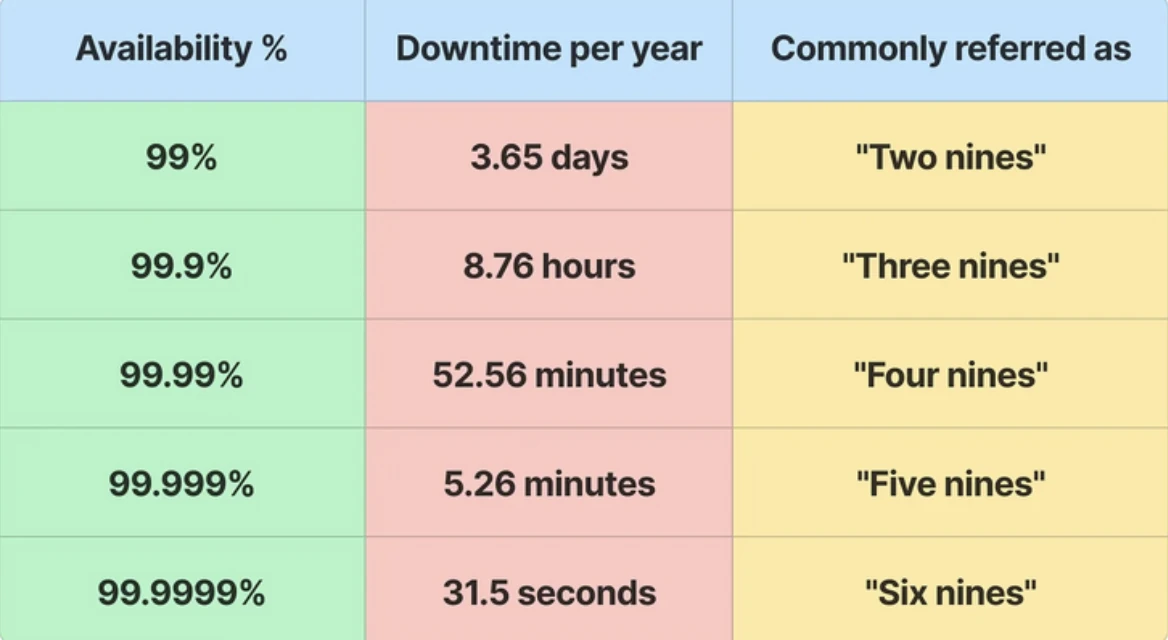
- Availability measures how often a system is operational and accessible when needed
$Availability = Uptime / (Uptime + downTime)
Fault Tolerance
Can the system keep running despite failures?
Fault tolerance is the system’s ability to continue operating correctly even if some components fail.
It’s about designing the system to handle failures gracefully without affecting functionality.
Reliability
Relibaility is more about data consistency. So an available system can be unreliable and a reliable system can be unavailable
Reliability is achieved through redundancy / replication of both the software components and data.
- If the server carrying the user’s shopping cart fails, another server that has the exact replica of the shopping cart should replace it.
Data Consistency Vs Data Integrity
Data Consistency
ensuring that the system maintains consistent state across machines / operations.
Sabme same data pada hua hai.. Data Consistency is generally achieved through replication
Data Integrity
It’s more about correctness of data.
If the system is serving correct data or not. So one can ensure data consistency but can serve incorrect data. Data sahi hai ?
Generally ensured by using checksums and Hash functions.
Latency and Throughput
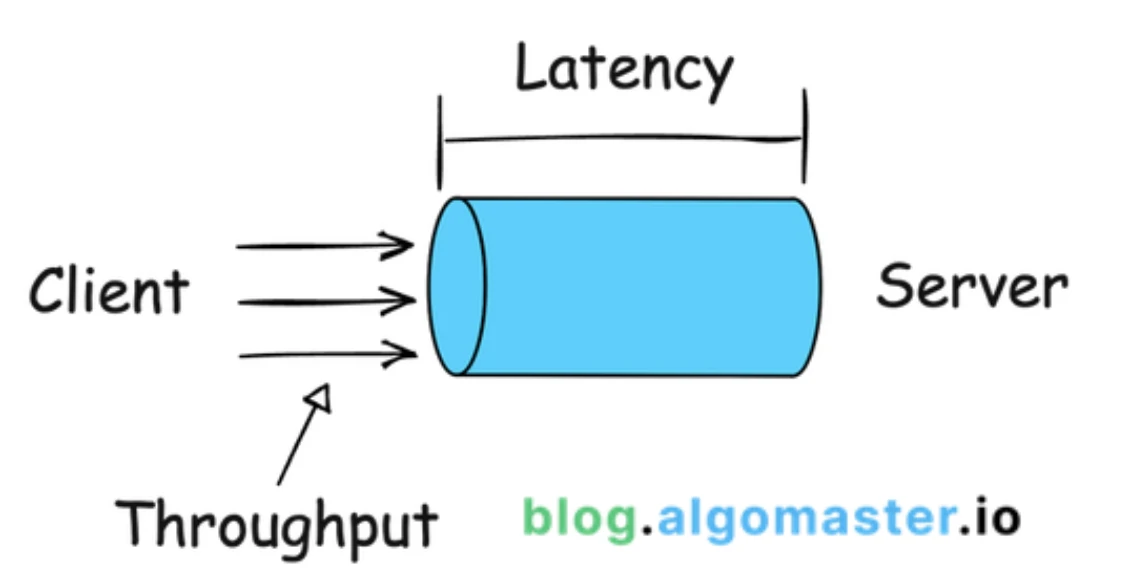
- Latency : Request kitna time le rhi hai complete hone mai..
- Throughput : How many requests a system can process in one second.
Kitni requests process ho skti hai ek second mai
Throughput is expressed in RPS(Request per sec) or TPS(Transaction per sec)
Monitoring
Infrastructure level / Service level / Application Level
Infrastructure
- Disk usage / CPU usage / Cluster Health / Memory usage (heap size) [ New Relic / Prometheus / Grafana ]
Service Level
- Health of your services. Request Latency , p99 , error rates , throughput
Application Level
- (Business Metrics) : Number of users / Concurrent users / Active sessions or connections
Back of Envelope Estimation
Fundamentals
> 1 byte = 8 bits
| 1 KB | 1,024 bytes / 1,000 bytes | 2^10 bytes |
|---|---|---|
| 1 MB | 1000KB / 10^6 bytes | 2^20 bytes |
| 1GB | 1000 MB / 10^9 bytes | 2^30 bytes |
| 1 TB | 1000GB / 10^12 bytes | 2^40 bytes |
| 1 PB | 1000TB / 10^15 bytes | 2^50 bytes |
Memory Estimation [JAVA]
JAVA Memory Rough Rule ~ Take approximations
Object Header : Every object in Java has a header — for metadata like class info and GC.
- 12 bytes (32-bit JVM) or 16 bytes (64-bit JVM) → Use 16 bytes
Reference : 4 bytes
Primitive sizes
boolean → 1 byte , byte → 1 byte, char → 2 bytes (UTF-16), short → 2 bytes,
int → 4 bytes, float → 4 bytes, long → 8 bytes, double → 8 bytes
Alignment: Java objects are usually aligned to 8 bytes — so round up to the next multiple of 8.
Common Data Structure
| Structure | Approx Size | Details |
|---|---|---|
| String | ~24 bytes overhead + internal char[] | E.g., "Hello" → 24 bytes + (16 + 2*5) ≈ 56 bytes. |
| char[] | 16 bytes header + 2 bytes per char | Array header + data. |
| ArrayList | ~24 bytes + backing array | Backing Object[] → 16 bytes + 4 bytes per slot. |
| LinkedList Node | ~32 bytes per node | Object header + 2 references + item ref. |
| HashMap | ~32 bytes base + buckets | Buckets: Node[] → 16 + 4 bytes per slot. |
| HashMap Node | ~32 bytes + K + V | 16 bytes header + K ref + V ref + next ref + int hash. |
Rough Throughput & Latency
Latency number everyone should know
Throughput - How much data can be processed per second.
For CPU caches and RAM, throughput means how fast the CPU can read or write data to/from that memory.
For disks (HDD, SSD) or networks, throughput means how much data can be transferred over the device or connection per second.
| Resource | Throughput | Latency |
|---|---|---|
| L1 Cache (Closest to CPU) | ~1,000s of GB/s | ~1 ns |
| L2 cache | ~100s of GB/s | ~3–5 ns |
| L3 Cache (share among all cores in a CPU) | ~100 GB/s | ~10–20 ns |
| RAM | ~10–50 GB/s | ~50–100 ns |
| SSD | ~500 MB/s – 3 GB/s | ~0.1 ms (100 µs) |
| HDD | ~100 MB/s | ~10 ms |
| Network | ~100 Mbps (12.5 MB/s) | ~50–100 ms (internet round trip) |
| Data Center | 1–10 Gbps (125–1,250 MB/s) | ~0.5–1 ms (same rack) |
Quick Conversion
100 Mbps (Mega bits per second) ≈ 12.5 MB/s
1 million requests/day ≈ 11.6 requests/sec (1 million / 24 / 60 / 60)
1 request per sec ≈ 86,400 requests/day
Availability
A service level agreement (SLA) is an agreement between you (service provider) and your customer which defines the level of uptime your service will deliver.
Cloud providers like Google , Amazon and Microsoft have SLA at 99.9% or above
x % downtime → availability → $x/100 \* 24 \* 60$ minutes of downtime per day
| Availability (%) | Downtime per day | Downtime per year |
|---|---|---|
| 99 | 14.40 minutes | 3.65 days |
| 99.9 | 1.44 minutes | 8.77 hours |
| 99.99 | 8.64 seconds | 52.6 minutes |
Infra Estimates
Redis (in-memory cache) QPS: ~50k–200k ops/sec/node.
CDN edge cache hit ratio: 80–95% is common.
1 CPU core: ~1–2 GHz → ~1–10 million simple ops per ms.
**Performance Benchmarks
**1 server with 32 GB RAM, 8 CPUs handles:
Light web traffic: ~100–1,000 requests/sec.
DB writes: ~100–500 writes/sec (depends a LOT).
5,000-10,000 concurrent connections (6MB per connection average)
Web Application Servers 👍
Resource Usage Rules of Thumb 👍
Plan for 70-80% max CPU utilization
Leave 20-30% memory headroom
Garbage Collection
SSL/TLS encryption overhead (~10-20% CPU)
Logging and Monitoring
Example : For Server requirements you should measure only 3 things
Traffic :
RPS (request per sec)
Expected concurrent users (peak and average)
Traffic patterns (steady, spiky, time-of-day variations)
App Requirement
Type of application (web app, API, database-heavy, compute-intensive)
Response time requirement
Resource usage per request (CPU, memory, I/O)
Hardware / Infra / Cost
Server specifications you're considering (CPU cores, RAM, storage)
Load balancing strategy
Example: Estimate Twitter QPS and storage requirements
Assumptions:
300 million monthly active users.
50% of users use Twitter daily.
Users post 2 tweets per day on average.
10% of tweets contain media.
Data is stored for 5 years.
Query per second (QPS) estimate:
Daily active users (DAU) = 300 million * 50% = 150 million
Tweets QPS = 150 million * 2 tweets / 24 hour / 3600 seconds = ~3500
Peek QPS = 2 * QPS = ~7000
We will only estimate media storage here.
Average tweet size:
tweet_id 64 bytes
text 140 bytes
media 1 MB
Media storage: 150 million * 2 * 10% * 1 MB = 30 TB per day
5-year media storage: 30 TB * 365 * 5 = ~55 PB
Infra Terms
Q) What is Database Cluster ?
A Cluster is basically a group of identical nodes (machine). The purpose of keeping many nodes in a cluster is
Higher availability: If one node goes down, others keep running.
Scalability: Multiple nodes share the workload.
Fault tolerance: Data can survive node failures.
You can have a
Database Cluster : several database servers cooperating
Compute Cluster : several machines doing parallel computation.
Q) What is Replica Set
- It’s basically leader + followers/slaves
What are Replica’s used for ?
Failover: If the primary dies, secondaries elect a new primary automatically.
Read scaling (optional): You can configure some reads to go to secondaries (with weaker consistency). For example, analytics or non-critical reads.
Data safety: If a node fails, you don’t lose data — secondaries have copies.
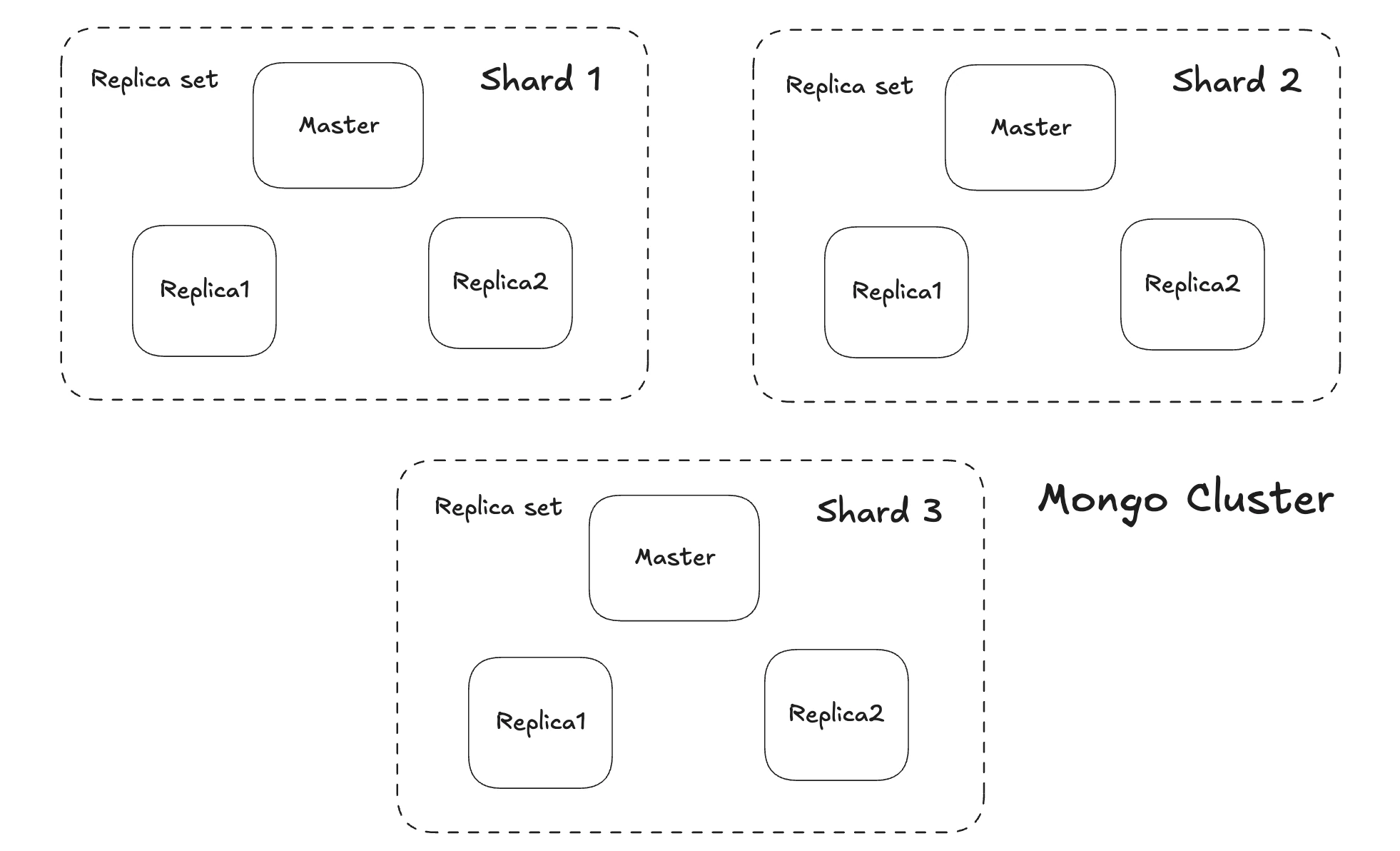
Example : MongoDB cluster of 5 nodes with one master
In the following diagram you can see a Mongo cluster with sharded data each Shard is itself a replica set with a primary + secondaries.
Load balancers + mongos routers spread traffic to appropriate shard.
## Consensus Algorithm
In distributed systems, a consensus algorithm is how a group of independent, unreliable nodes agree on a single value or decision, even if some nodes fail or messages are delayed or lost.
Simply → “How do we make sure everyone ends up with the same decision?”
Instead of multiple independent databases, you have a replicated group of nodes working together to maintain one consistent state (e.g., a distributed log, a config store, or a replicated database).
For example :
Who is the leader?
What is the next log entry to commit?
What is the final value for a key?
🧠Consensus algorithm solves database consistency problem (replicated database should be consistent). You want strong consistency across nodes.
✨In systems with multiple replicas, there is a possibility that the user reads inconsistent data. For example, when there are three replicas, R1 , R2 , and R3 in a cluster, and a user writes value v1 to replica R1 . Then another user reads from replica R2 or R3 which are still behind R1 and thus will not have the value v1 , so the second user will not get the consistent state of data
Quorum → A quorum is the minimum number of nodes that must agree for a decision to be valid.
In consensus, it’s usually a simple majority ( >50% )
So in consensus, the system makes progress when a quorum (majority) agrees — even if some nodes are down.
Example :
You have 5 replica nodes. A Raft leader proposes a new log entry.
If at least 3 of the 5 replicas store and acknowledge it → it’s committed ✅
Quorum also prevents split brain, a condition in which due to network partition creates a group of nodes to each believe they can elect a new leader so there can be multiple leaders created each accepting writes independently creating data inconsistency.
So in the case of 5 replica-set we have a quorum of 3 (ceil(5)). Which means that any operation requiring cluster consensus needs 3+ nodes to agree. So if a network partition occurs and cluster is divided into groups of 3 and 2 nodes. Then 2 nodes can never form a quorum so it cannot elect a new leader.
Raft ✅
Raft is a consensus algorithm designed to be understandable and practical.
How Raft works:
All nodes start as followers. If they don’t hear from a leader, they become candidates.
Candidates ask other nodes to vote for them. If a candidate gets a majority, it becomes leader.
The leader handles log replication: it takes writes, appends them to its log, then replicates them to followers. Followers acknowledge back.
Once a quorum has the entry, it’s committed.
Paxos ✅.
Nodes act as proposers, acceptors, and learners. A proposer suggests a value and Acceptors agree to accept it if it’s safe.
If a quorum(majority) of acceptors accepts the same value, it’s chosen.
Paxos tolerates node failures as long as a quorum (majority) is available
CAP Theorem
Consistency (C): Every read gets the latest write.
Availability (A): Every request gets a response (even if some nodes are down).
Partition Tolerance (P): The system works even if some nodes can't communicate (network split).
> It is impossible for a distributed data store to simultaneously provide all three guarantees
Before Understanding CAP let’s understand what partition really is..
Consider a 5-Node MongoDB cluster with one master and 4 slaves
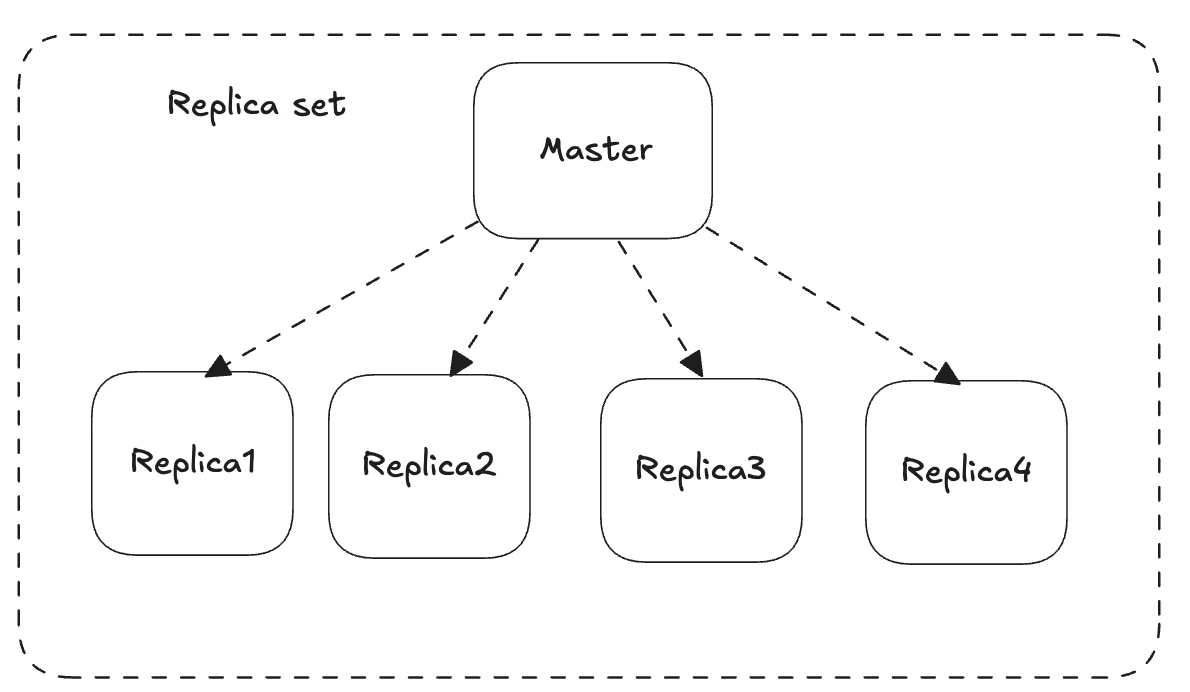
CASE - 1
Nodes are Down - Not a partition
- Nodes are down is not a partition it’s called Failure. But if nodes are alive and cannot talk to each other → That’s Partition
CASE-2
Communication b/w Replica-4 and Master breaks. → Parital Parition
Master still has a majority quorum (3/5) so it still serves write requests.
So primary stays leader, writes continue, no step down
CASE-3
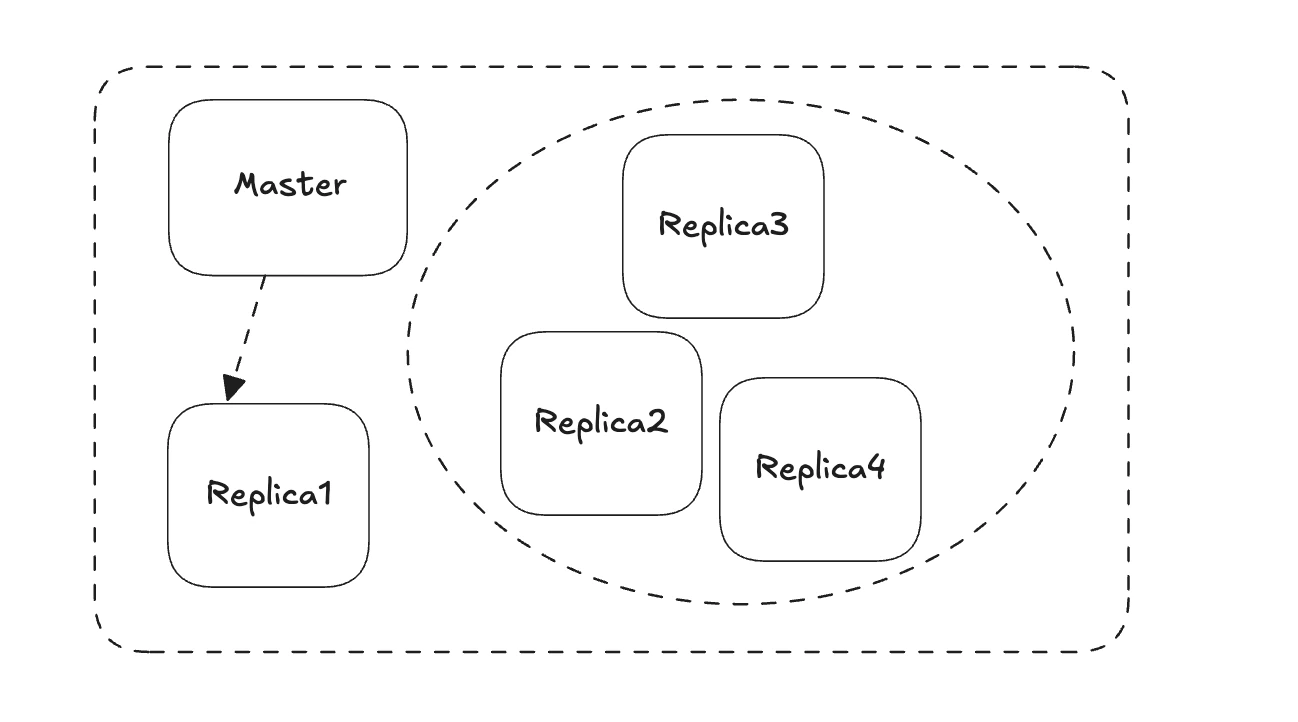
- Communication b/w Replica-2 , Replica-3, Replica-4 and Master is broken
Now we have a group of 3 nodes and 2 nodes. (Master and Replica1) , (Replica2, Replica3 , Replica4)
All nodes in a group can talk to each other
The leader has lost the quorum(3/5) so now CAP kicks in. You have 2 choices
Consistency (CP) → Master refuses writes (because no quorum).
Availability (AP) → you might allow writes on the 2 nodes, but you risk split-brain or data conflicts later.
Split brain will happen here because the other group of 3 nodes now has the quorum so they will elect a new leader. So now we will have 2 leaders.
So in ideal case write goes to Primary and then replicated to secondary nodes. But in case of Network partition you can choose how you want to design your system**
**
SUMMARY : In a Network Partition
🔹 If the system prefers Consistency + Partition Tolerance (CP):
The primary sees it doesn’t have quorum → it must step down.
Clients trying to write get an error: “Not primary”.The side that does have quorum (the 3 nodes) can elect a new primary.
Only writes to the side with quorum are valid → consistency is preserved.
🔹 But if the system prefers Availability + Partition Tolerance (AP):
The old primary does NOT step down.
It continues to accept writes even without quorum.
Meanwhile, the other side (3 nodes) can also elect a new primary and accept writes.
So now you have two primaries, each accepting writes independently.
This is called split-brain.
🔹 What happens next?
When the partition heals:
The two sides must reconcile: Which version of data is correct?
They might have conflicting writes: same document updated differently on both sides.
Some databases auto-merge (last write wins, vector clocks).
Some require manual conflict resolution.
🔹 Example in practice:
Cassandra prefers AP: It can accept writes on any replica, even if some are unreachable. Then, when nodes reconnect, it reconciles using timestamps.(eventual consistency)
DynamoDB (original Amazon Dynamo design) is AP too (High availability)
CouchDB → also prefers AP
MongoDB replica sets by default are CP: the primary refuses writes if quorum is lost.
Spanner (CP) → prefers consistency, uses true-time, global locks.
BigTable (CP) → Strictly consistent reads and writes.
Hbase(CP)
RDBMS → (CA)
**🧠**Different Parts of system can have different states can be consistent / available
- By Default - prefer availability Strong consistency is required only in those systems where reading stale data is not accepted
Strong consistency : Banking Booking platform , Inventory manager.
Rate Limiting
- Rate limiting helps protect services from being overwhelmed by too many requests from a single user or client.
Rate Limiting Algorithms 👍
Token Bucket
Tokens are just counters. This algo handles burst traffic. Each request consumes one token. Tokens is also refilled at a fixed rate
Allows bursts traffic within the overall rate limit.
Leaky Bucket
- Bucket with a small hole. counter decreases at a fixed rate. Like a funnel even if you
fill fast output is steady
- Smooth traffic flow at constant rate.
Fixed Window Counter
Spikes at window boundaries
Limits requests in fixed time intervals.
Sliding Window Log
- Tracks requests within the rolling time window.
Sliding Window Counter
- Suppose the rate limit is 10 req / hour. The logic is simple → at any point in time check how many requests happened in the past hour
(from now - 1 hour to now) if count >= 10 ⇒ deny the request
- Smooths rate between adjacent fixed windows.
Reference https://www.hellointerview.com/learn/system-design/problem-breakdowns/distributed-rate-limiter
https://stripe.com/blog/rate-limiters
Message Queues
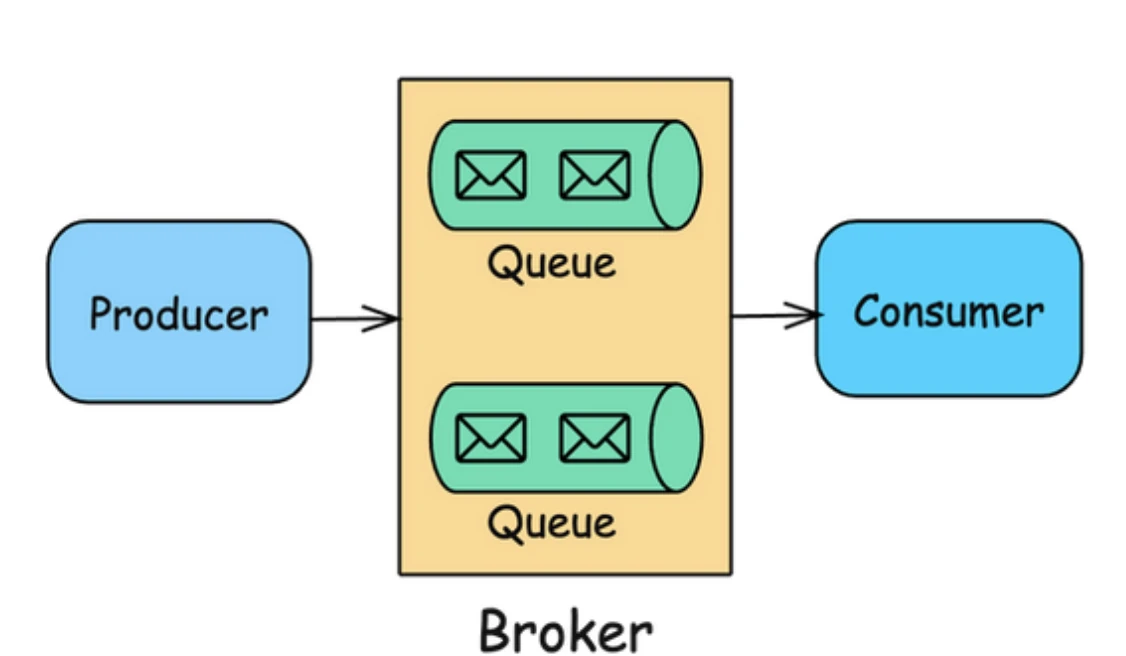
- An asynchronous communication pattern where messages are stored in a queue until the receiving service / consumer is ready to process them, enabling decoupling between producers and consumers.
Due to this decoupling producers and consumers can be scaled independently.
Producers can send messages to the queue and move on to other tasks without waiting for consumers to process the message
Multiple consumers can pull messages from the queue, allowing work to be distributed and balanced across different consumers
🔹Message Queue Basic Functionality
The queue's major job is to smooth out the load on the system
Queues can be used to handle sudden bursts in traffic. Since producers and consumers are decoupled, Queues can be used to ensure even distribution of workloads across consumers.
During high workload / traffic more workers / consumers can be added for processing messages
If the queue is empty then we can reduce the number of workers / consumers
AutoScaling based on Load
🔹Basic Flow:
Producer creates a message and sends it to the queue
Queue (broker) stores the message persistently
Consumer retrieves and processes the message when ready
Message is acknowledged and removed from queue after successful processing
If processing fails, message can be retried or moved to dead-letter queue
🔹Common Patterns
Point-to-Point: One producer → Queue → One consumer
Publish-Subscribe: One producer → Topic → Multiple consumers
Work Queue: Multiple producers → Queue → Multiple consumers (load distribution)
PubSub / Message Queue (Kafka / SQS)
The 2 core Model in asynchronous communication are Publish-Subscribe and Message-Queue
Both of these methods are Producer-Consumer where there are multiple producers producing messages for async communication and there are multiple consumers who will be consuming these messages.
- But the way these consumers consume messages… that creates the basic difference.
Message Broker
- It’s just the infrastructure that enables these models . Think of it as the post office that routes messages. Nothing else
Queue: [Work] → Worker picks it up → Done
Pub-Sub: [Event] → Everyone notified → Each acts independently
Message Queue (Competing Consumers)
Each message is processed by one consumer / worker
Message is deleted after consumption ⇒ Used for Work distribution, load balancing
SQS is many-many
Many producers → SQS Queue → Many workers
Multiple workers poll the same queue
Example : SQS, RabbitMQ queues
Producer A ─┐
Producer B ─┼──→ [SQS Queue] ──→ Worker 1 (gets msg #1)
Producer C ─┘ ├──→ Worker 2 (gets msg #2)
             └──→ Worker 3 (gets msg #3)
Publish Subscribe (Fan-out)
Publishers → Topic → Subscribers
Each message is delivered to all subscribers. Message is copied/broadcast to all subscribers
Example : Kafka Topics , SNS, Event notification, broadcasting updates
Kafka as a Message Queue [ Fanout + Work Queue ]
Kafka is primarily pub-sub by design (topics with multiple subscribers) but
Can act as message queue through consumer groups
Multiple consumers in same group = only one gets each message (queue behavior)
Multiple consumer groups = each group gets all messages (pub-sub behavior)
Topic: "orders"
├─ Consumer Group A (payment-service) → Gets all orders
└─ Consumer Group B (3 workers) → Split orders between workers
   ├─ Worker 1 → Gets messages 1,4,7...
   ├─ Worker 2 → Gets messages 2,5,8...
   └─ Worker 3 → Gets messages 3,6,9…
SNS + SQS (Pub-Sub Pattern) [ Fanout + Work Queue ]
As we know SQS is primarily Message queue and SNS is a pub-sub 1 message is broadcasted to all queues.
SNS = 1:many (broadcast to all queues) Each SQS = many:many producers-workers, but 1:1 message-to-consumer
SNS Topic (pub-sub)
├─→ SQS Queue A → Workers (email service)
├─→ SQS Queue B → Workers (SMS service)
└─→ SQS Queue C → Workers (push notification)
Alternatively we could have just used Kafka with multiple consumer groups to achieve the same thing as with SNS + SQS
Caching
The primary goal of caching is to improve system performance by reducing latency, offloading the main data store, and providing faster data retrieval.
- The idea is to temporarily store copies of data in high-speed storage layers to reduce the time taken to access data.
Distributed Cache
A distributed cache is a system that stores data in memory across multiple servers or nodes in a network, so that the data can be quickly accessed by many clients or applications.
> Distributed caches lean toward eventual consistency for speed, unless strong consistency is explicitly needed.
A distributed cache can be implemented using either sharding or replication, or sometimes both
Sharded Redis (Partitioned Cache) : Also known as Redis Cluster mode.
Replicated Redis (Master-Slave) : Also called Redis Sentinel mode (for monitoring/failover).
Cache Eviction Policy 👍
What happens when the cache is full ? Which item should be removed ??
Least Recently Used (LRU): Evicts the least recently accessed items first.
First In, First Out (FIFO): Evicts items in the order they were added.
Least Frequently Used (LFU): Removes items that are least frequently accessed
Time to live (TTL) : Automatically removes items after a predefined expiration time has passed
Cache Invalidation Strategy 👍
This is the strategy you'll use to ensure that the data in your cache is up to date.
When your database is updated you will have to invalidate the cache. How do you invalidate the cache is important.
Cache Write Strategy 👍
This is the strategy you use to make sure that data is written to your cache in a consistent way.
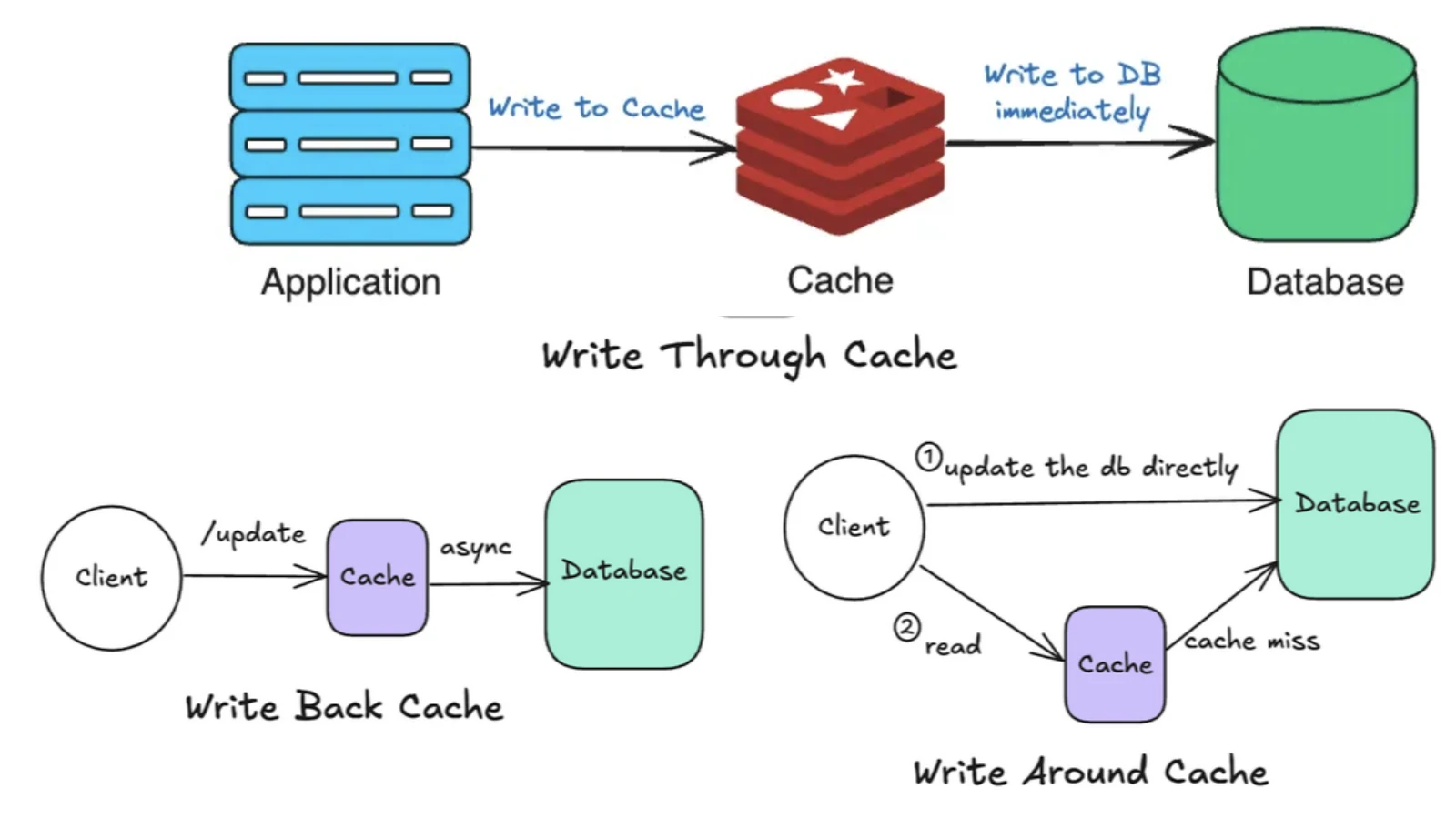
Write-Through Cache: ✅
Application Writes data to the cache. And the cache is responsible for writing the data to the database synchronously.
Write operation is considered complete only when both writes are successful.
Ensures consistency but can be slower for write operations. (increased latency)
Write-Around Cache:
Application Writes data directly to the database, bypassing the cache. It invalidates the data in the cache. So when the next read comes to the cache, data is not present so cache fetches the data from the database and updates itself and sends the response back to the application.
This can minimize cache pollution but might increase data fetch times on subsequent reads. Suitable when data updates are less frequent.
Write-Back Cache: ✅ Achieves Fault Tolerance..
Application Writes data to the cache and then the cache is responsible for asynchronously writing the data to the datastore. This can be faster for write operations but can lead to data loss if the data is not persisted to disk.
Good for high throughput applications. There is a risk that the write to disk will fail (data inconsistency).
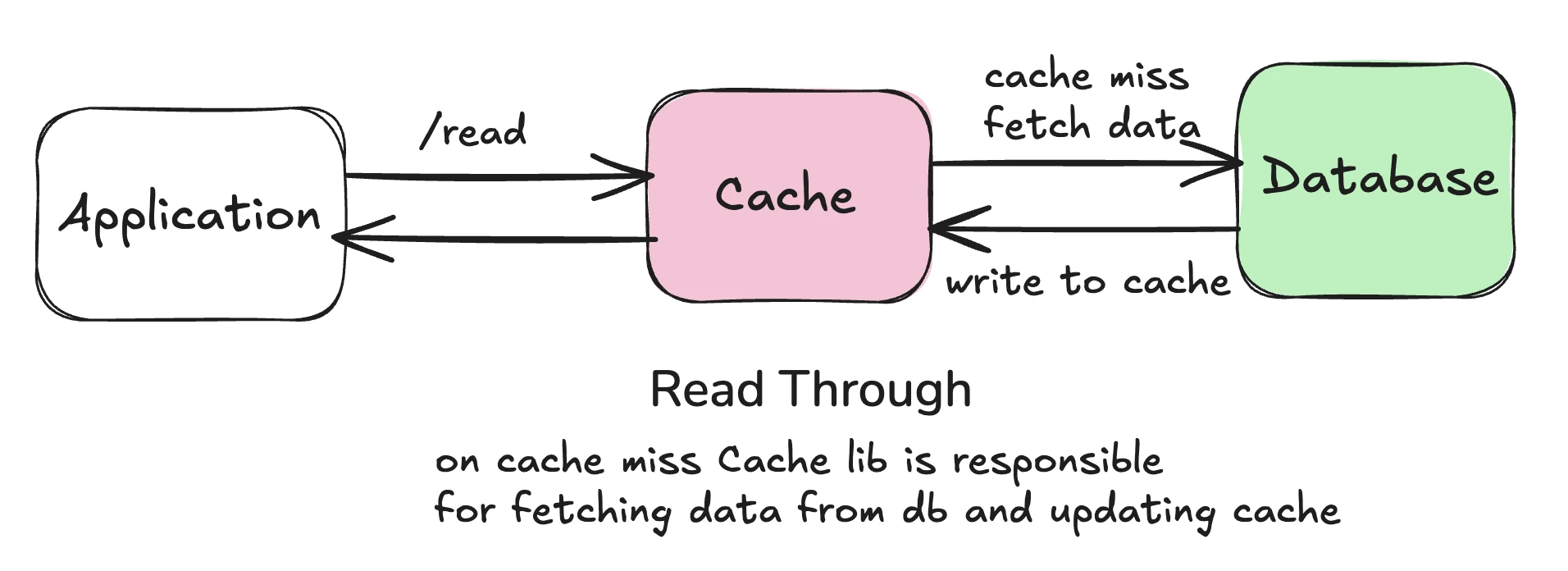
Read-Through Cache
- Application first checks the cache, if the data is found it is returned from the cache else the cache is responsible for fetching data from DB , store it back into the cache and the data is returned to the client.
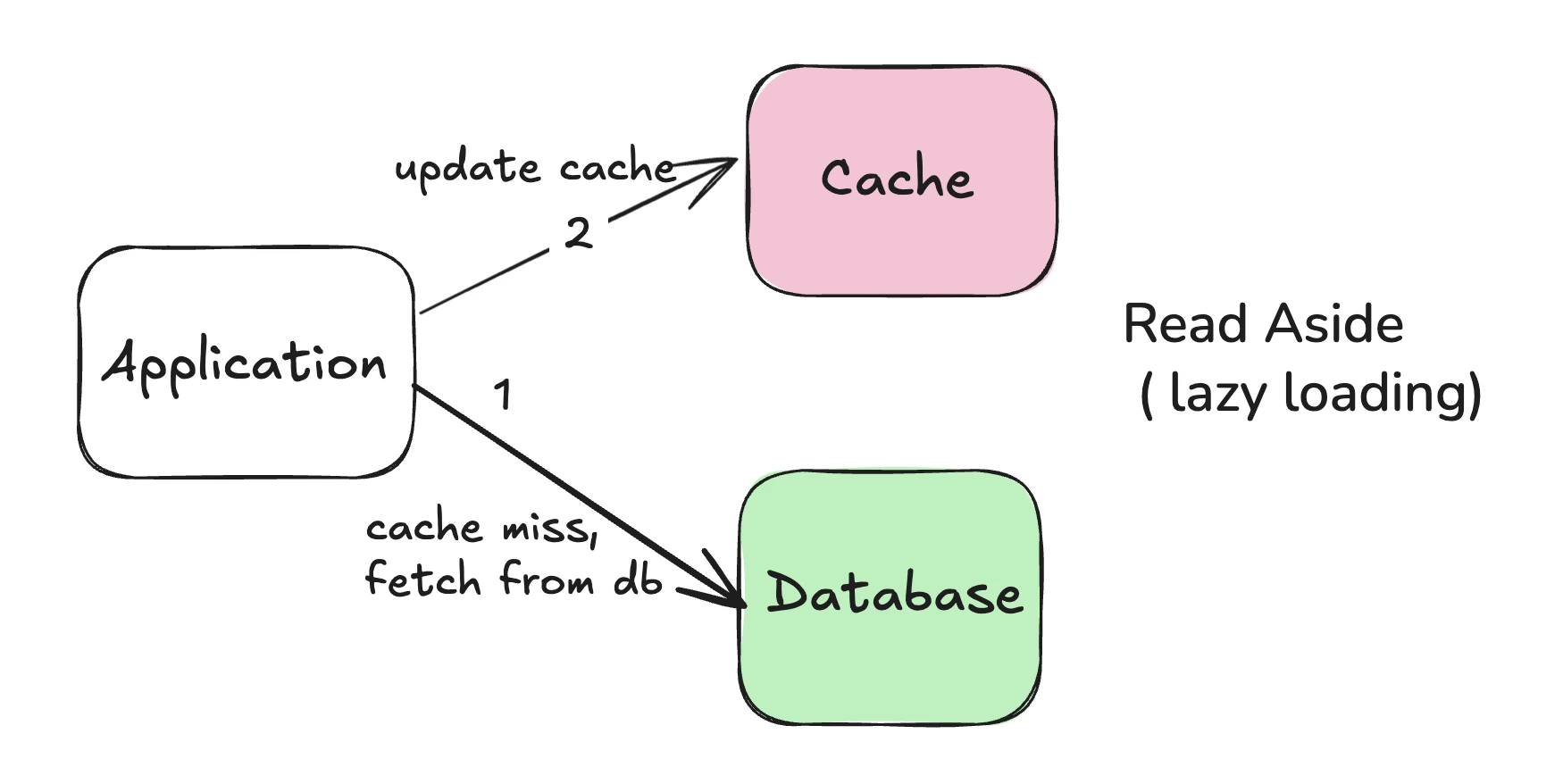
Read-Aside Cache ( Lazy Loading )
- Same as Read-Through just that application is responsible for fetching data from the database and updating the cache.
## Consistent Hashing
The act of distributing data across a set of nodes is called data partitioning
In consistent hashing we hash both nodes and keys:
Nodes → hash to a position on a circle.
Keys → hash to a position on the same circle.
Each key goes to the next node clockwise on the ring.
There are two challenges 👍
How do we know on which node a particular piece of data will be stored ?
How can we minimize data movement when nodes join or leave?
So a basic approach would be to use a Hash function and node_pos = Hash(key) % #nodes
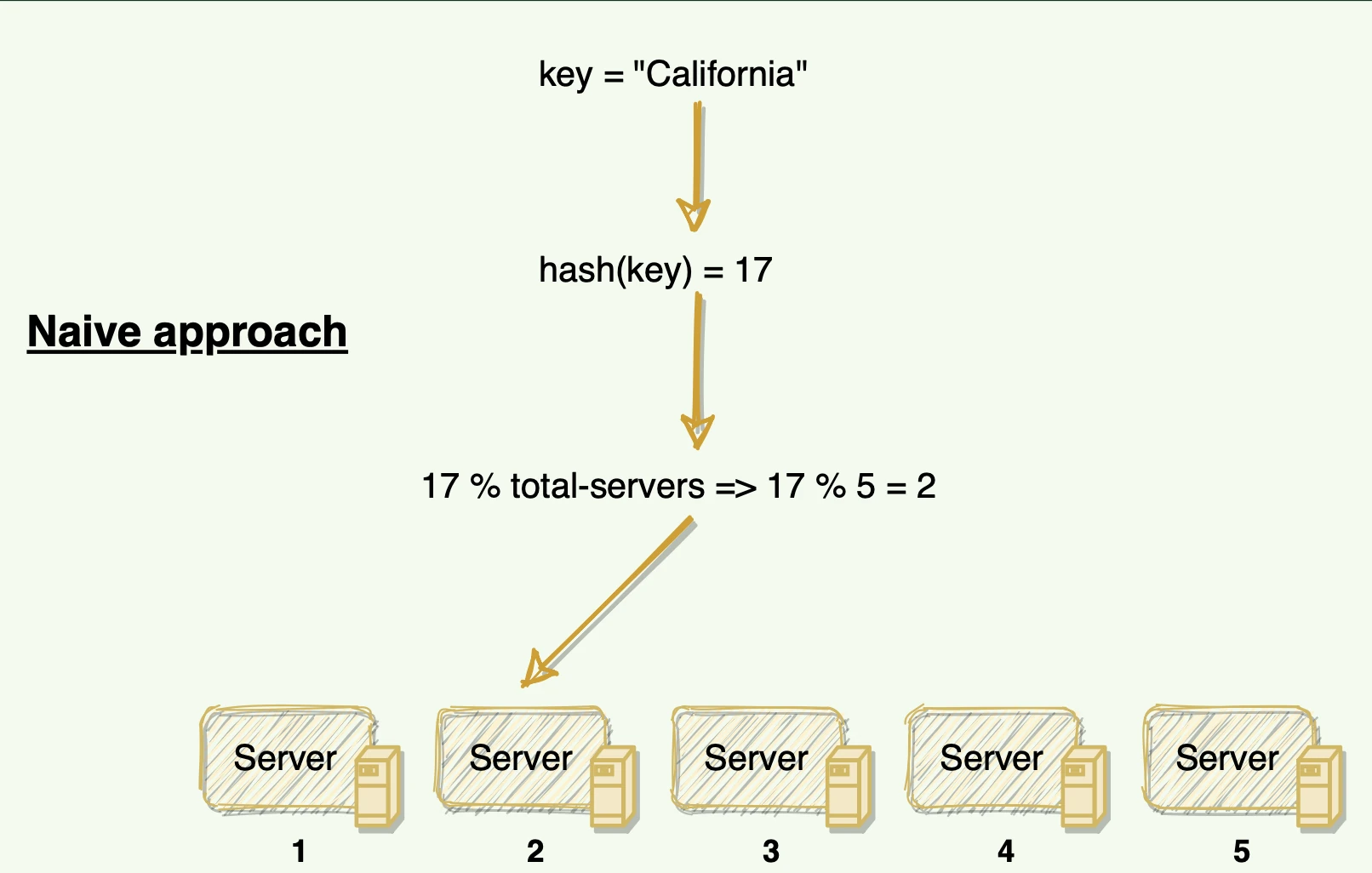
- The problem in this is if a node fails or we have to add a new node to the system we will have to remap all the keys and move our data based on the new server count.
- And as we already know we have to minimize this data movement as this will lead to a lot of downtime which we cannot afford
Solution : Use the Consistent Hashing algorithm to distribute data across nodes. Consistent Hashing maps data to physical nodes and ensures that only a small set of keys move when servers are added or removed.
Workflow
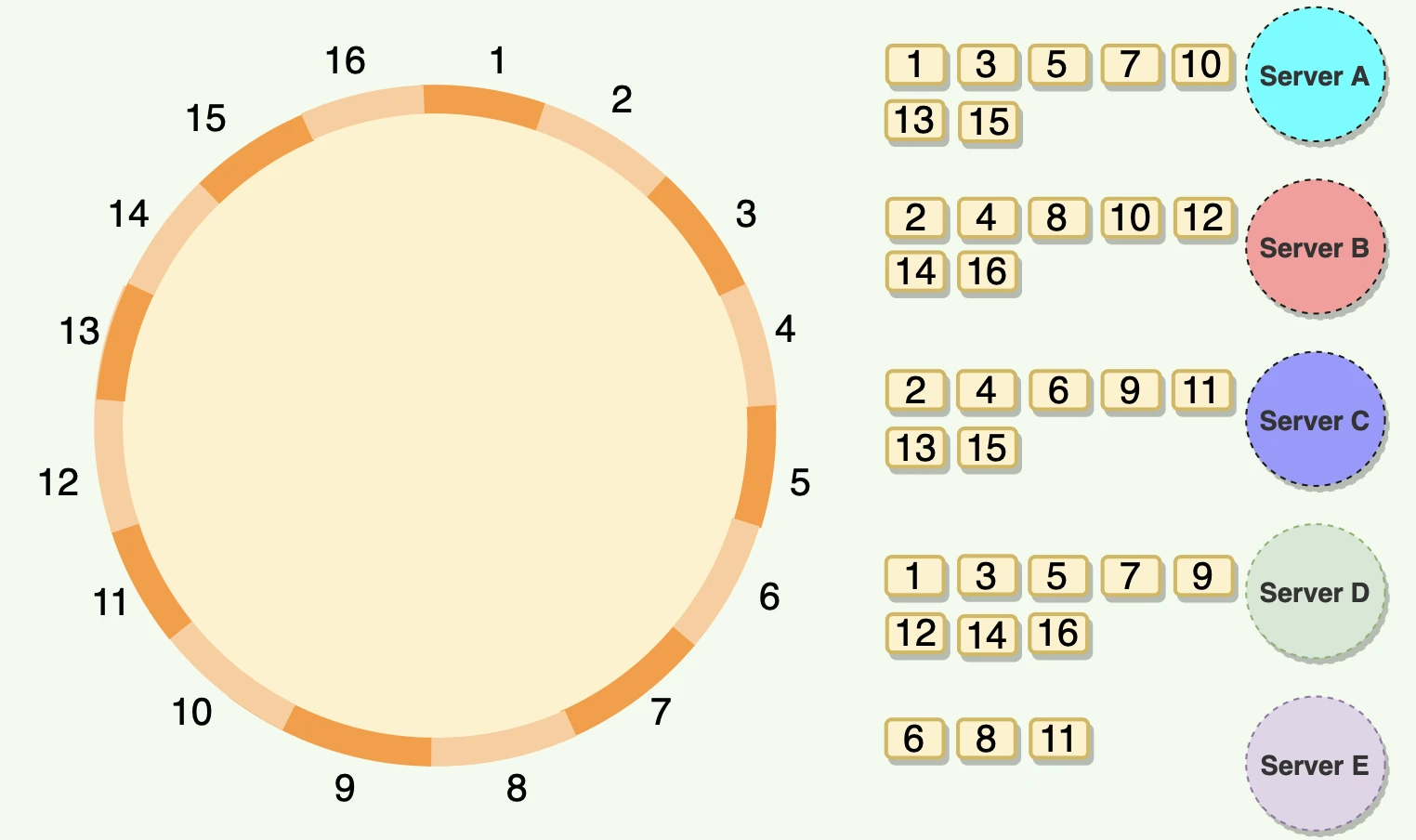
Each node(server) is placed in a ring. These nodes are assigned a range of data. As you can see in the image below each node is assigned a data range. So for example if the hash of incoming data is 84 it will go to Server 4. (Clockwise next server)
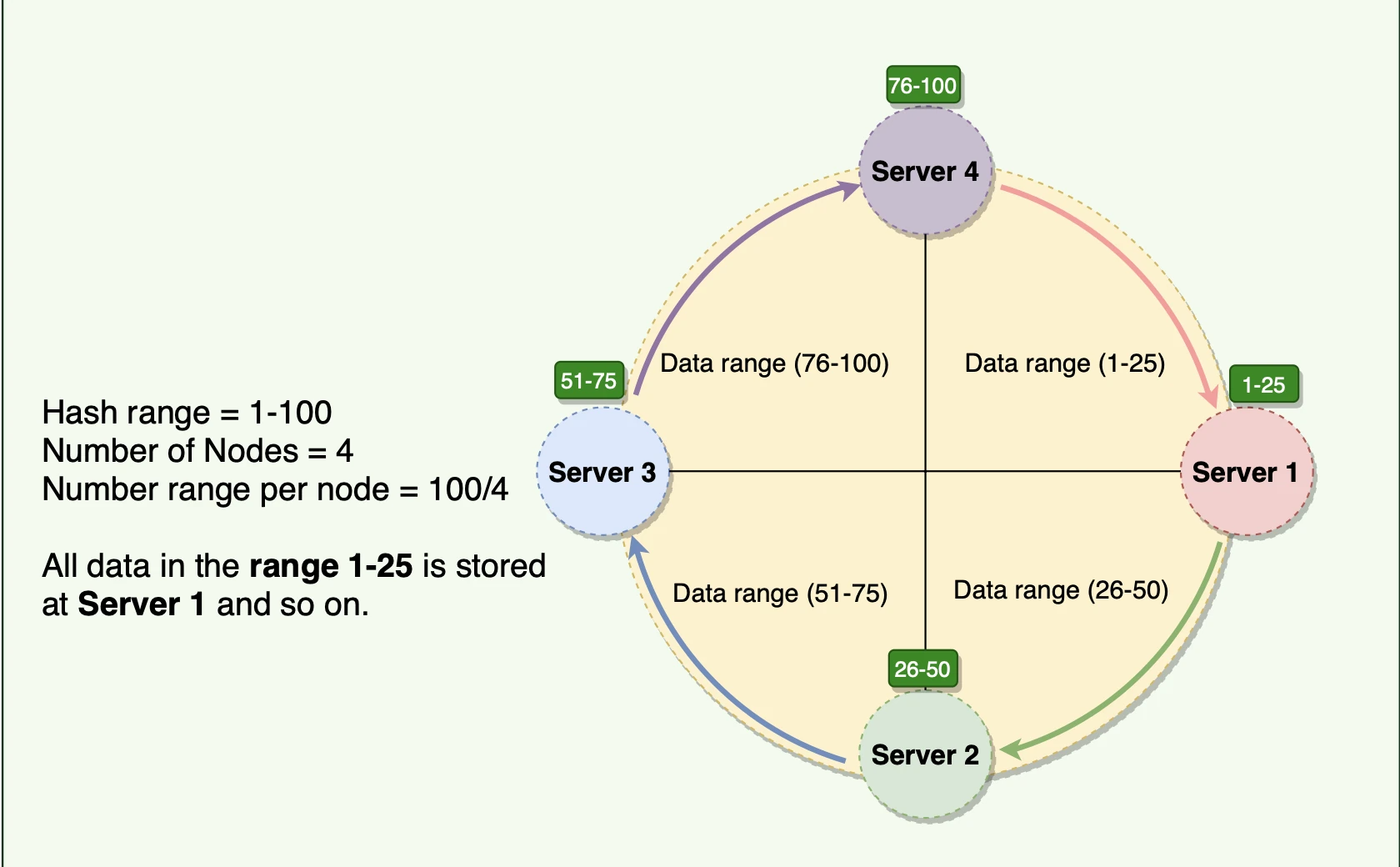
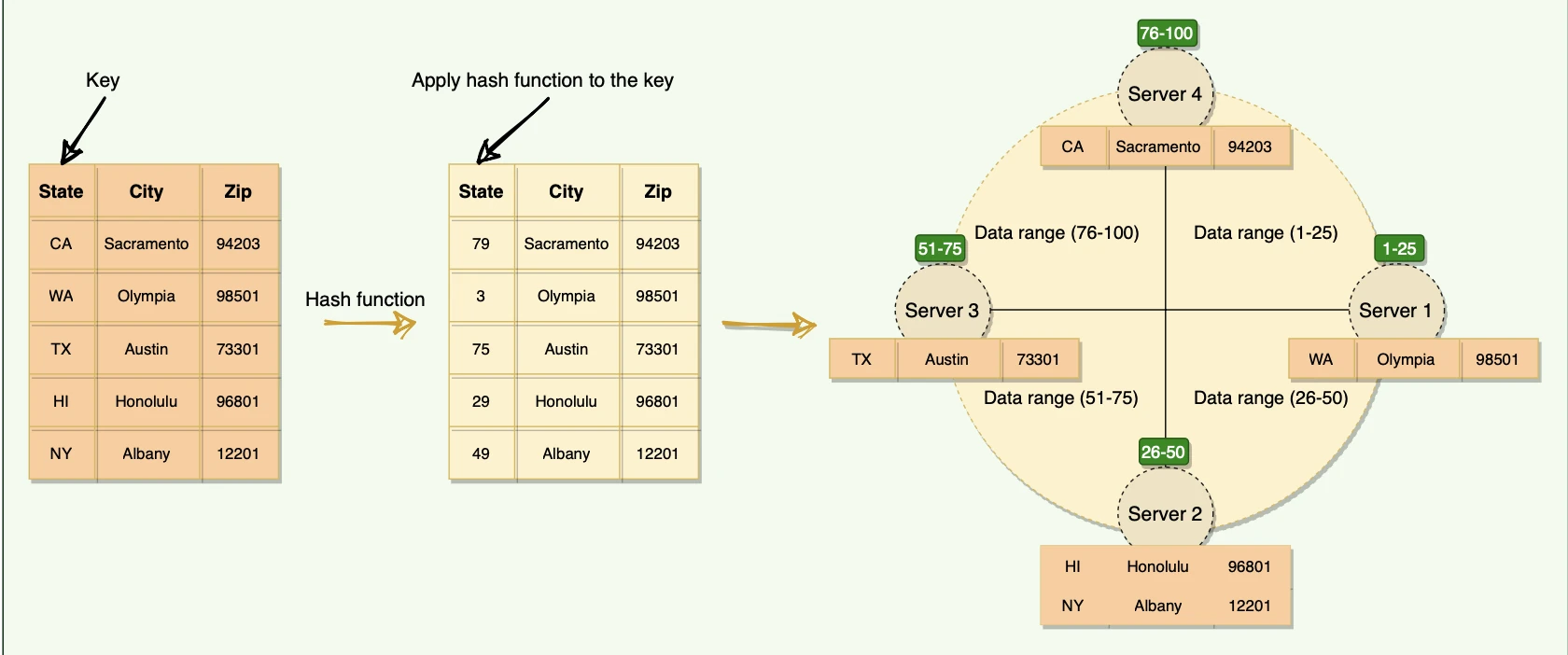
So when a system needs to read / write data it first Hash the incoming key using hashing algorithm (MD5)
The output of this hashing algorithm determines within which range the data lies and hence, on which node the data will be stored.
Pros
- The Consistent Hashing scheme above works great when a node is added or removed from the ring, as in these cases only the next node is affected so when a node is removed, the next node becomes responsible for all of the keys stored on the outgoing node
Challenges
- Consistent Hashing can result in non-uniform data and load distribution. This problem can be solved with the help of Virtual nodes.
Virtual Node
A virtual node (or vnode) is just a logical replica of a real node.
Each real server is hashed multiple times, creating multiple points on the ring.
So:
Server A might appear at 10, 45, 120.
Server B at 30, 70, 160…..and so on.
When a key is hashed, it still goes clockwise to the next hash — but now there are more points, so the load spreads more evenly.
Example :
Suppose you have 3 real servers: A, B, C.
Without vnodes:
- A → hash(“A”) = 10 , B → hash(“B”) = 120, C → hash(“C”) = 240
With vnodes (3 vnodes each):
- A → hashes at 10, 90, 180, B → hashes at 30, 150, 220, C → hashes at 60, 160, 250
A key hashing to 170 → goes to A’s vnode at 180. Key at 155 → goes to C’s vnode at 160.
PROS 👍
Multiple points per real node reduce the chance of gaps or clusters. If you have 100 vnodes per real node, you’re much closer to uniform spread. Load is much more evenly spread.
When a node joins or leaves, only its vnodes’ share of the keys moves — a small fraction of the total.
You can assign more vnodes to powerful servers, fewer to weak servers, decreasing the probability of hotspots
Application
> The whole point of consistent hashing is that when nodes are added or removed only a small fraction of keys needs to be redistributed.
Q) But what will happen if we don’t use consistent hashing and let all the requests be redistributed across servers when we add / remove a server ?
Cache Miss Everywhere :
- So earlier all the requests are being cached at your server level (in-memory caching) so when you add a new server the same request will go to another server which will result in cache misses. And since in a normal hash function adding one server will result in (N-1)/N total cache misses. Where N is the total number of servers. With consistent hashing this is 1/N
Thundering Herd 👍
- Because of cache misses there will be sudden increase in traffic to the database/ backend services which can overwhelm the system
Data Movement ⚡
- If this is a distributed database, you'd need to physically move most of your data between servers.
So where it is used in the Real world ?
Load Balancers
- Especially when sticky sessions are required. HAProxy / NGINX Plus
CDN
- Akamai and other CDNs use it to decide which edge server should cache specific content
Distributed Cache
- Redis Cluster uses consistent hashing to distribute keys across nodes
Distributed Databases
- Amazon DynamoDB for partitioning data. MongoDB for sharding
Message Queues
- Apache Kafka for partition assignment
Databases
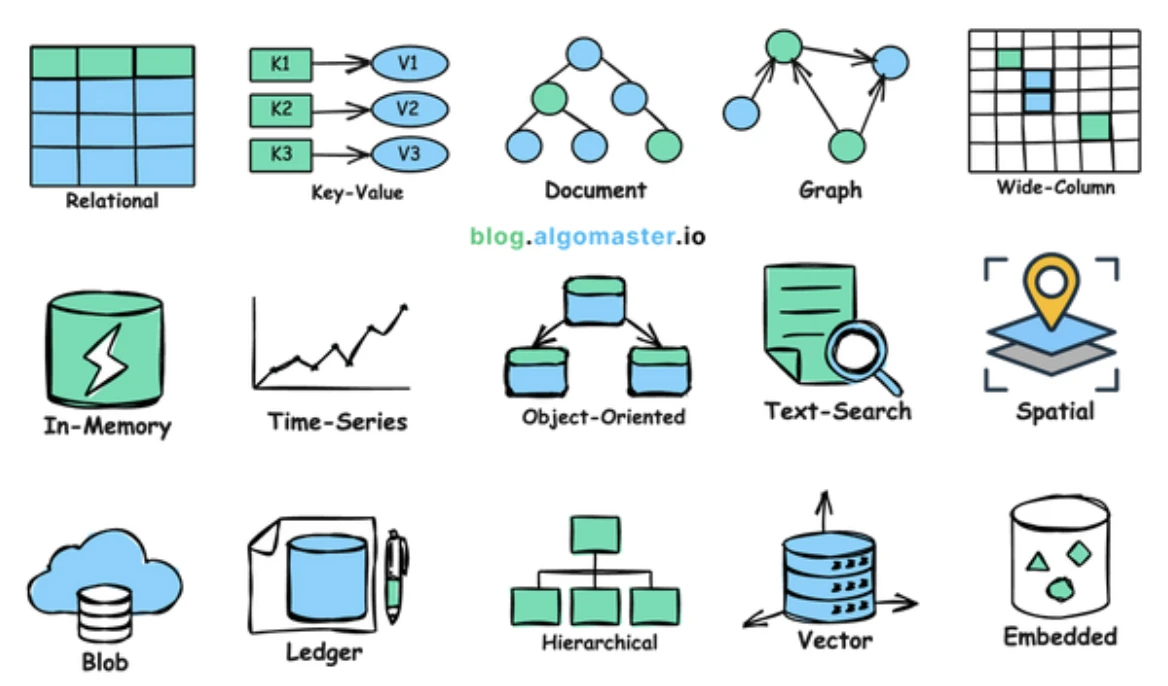
## How Data is actually stored on Disk ?
When a database or file system stores data on a disk (like HDD or SSD), it organizes the information into blocks or pages — small, fixed-size chunks (often 4 KB, 8 KB, or 16 KB).
- This is done because disk access happens in blocks.
Each storage engine determines how these blocks are structured, indexed, and accessed.
Components
Pages / Blocks: Data is written and read in blocks. Each block holds multiple rows or data entries.
Indexes : To speed up retrieval, structures like B-trees or hash indexes are stored alongside data blocks.
Write-Ahead Logging (WAL): Before modifying data on disk, a log of intended changes is written — ensuring crash recovery.
Buffer Pool / Cache : Frequently accessed data pages are held in memory for faster access. Changes are periodically flushed back to disk.
Two main types of storage engines when it comes to storing data on disk are LSM Trees and B+Trees.
FAQ
When you spin up a database node in a cluster what happens ? Where is data stored ? Who is responsible for indexing ?
Each database node in a cluster is a database server instance. The node has its own database engine process → mongod , mysqld, postgres etc.
This database instance is responsible for managing its own data and it holds replica of another node data (redundancy & fault tolerance)
The data is eventually stored in the underlying Disk. The disk can be a physical or virtual disk attached to the machine that runs the database server. [local HDD / SSD]
- Each database instance stores data files (like .ibd, .frm, .log, .db, etc.) on its own local storage path, defined in the database configuration (for example, MySQL’s datadir).
Role of Database Engine process / database server → Client for database server
Query Processing: Parses SQL (or query language), builds an execution plan, and determines how to fetch data.
Indexing: Creates and maintains indexes (like B-trees, hash maps, etc.) so data can be retrieved quickly.
Fetching / Caching Data: Retrieves data pages from memory (buffer pool) or disk, and caches frequently accessed pages.
Storage Management: Handles writing and reading data blocks to the underlying storage engine (InnoDB, RocksDB, WiredTiger, etc.).
Replication / Coordination (Cluster-Specific): Communicates with other nodes to keep replicas in sync or distribute queries.
So IF you kill the underlying process → That node is down…. in-memory state (buffer pool, caches, locks, etc.) is lost.
Database Replication
>>> Replication is the process of having multiple copies of data so that if a database goes down data isn’t lost (ensuring data reliability)
Distributed systems keep multiple copies of data for fault tolerance and higher availability. To achieve strong consistency, one of the options is to use a leader-follower setup, where the leader is responsible for handling all the writes, and the followers replicate data from the leader.
Each transaction/command on the leader is committed to a write-ahead log (WAL), so that the leader can recover from crashes or failures. A write request is considered successful as soon as it is committed to the WAL on the leader.
The replication can happen asynchronously; either the leader can push the updates to the followers, or the follower can pull it from the leader. In case the leader crashes and cannot recover, one of the followers will be elected as the new leader
Types of database replication :
Single leader replication
Master-Slave
All writes go to one database(master database), reads come from any database
Slave database reads from master database
No write conflict all write goes to a single database
Multi leader replication
Writes can go to a small subset of leader databases reads can come from any database
Can lead to write conflicts
Leaderless replication
Writes go to all databases, reads come from all databases
Can lead to write conflicts
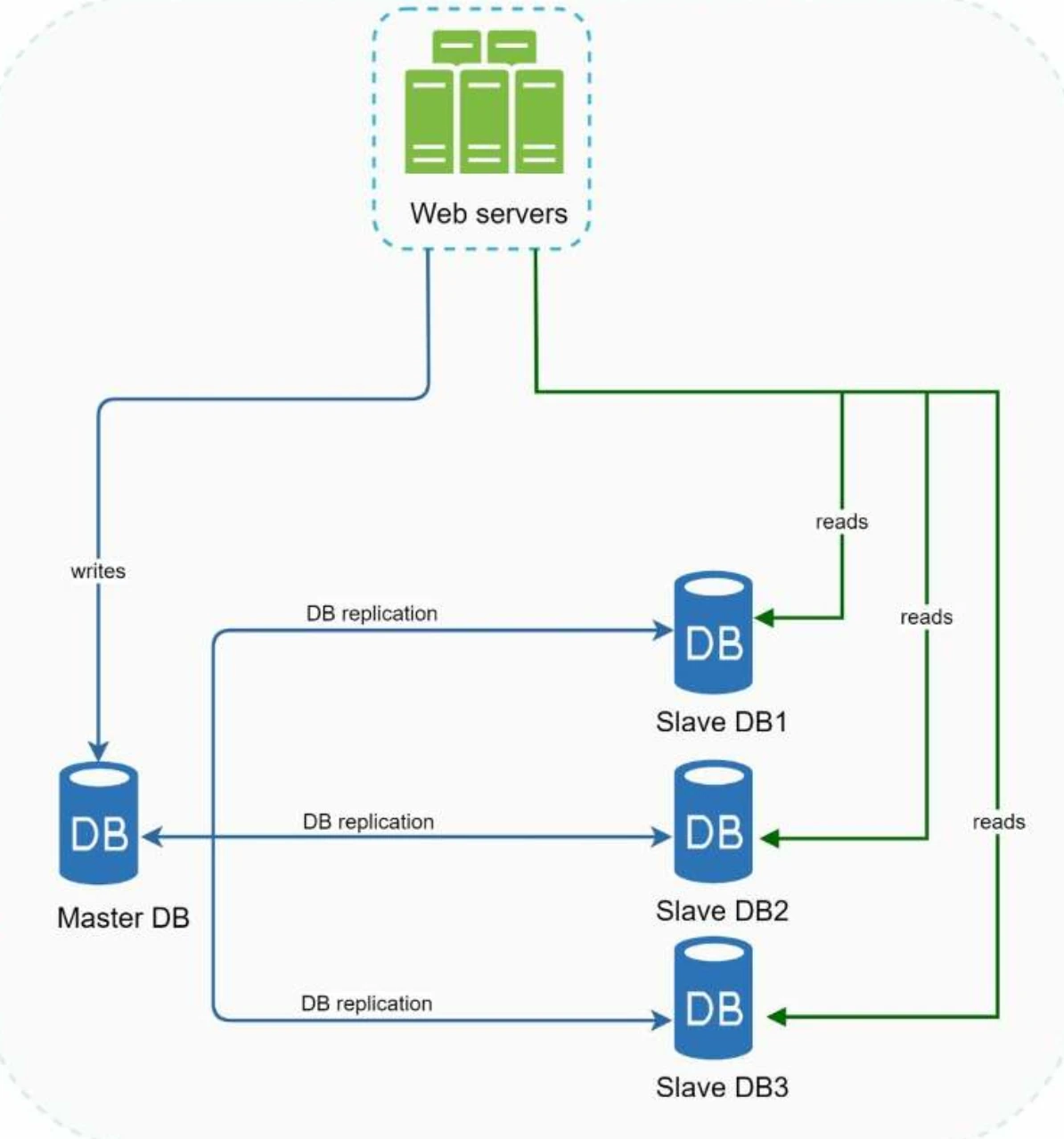
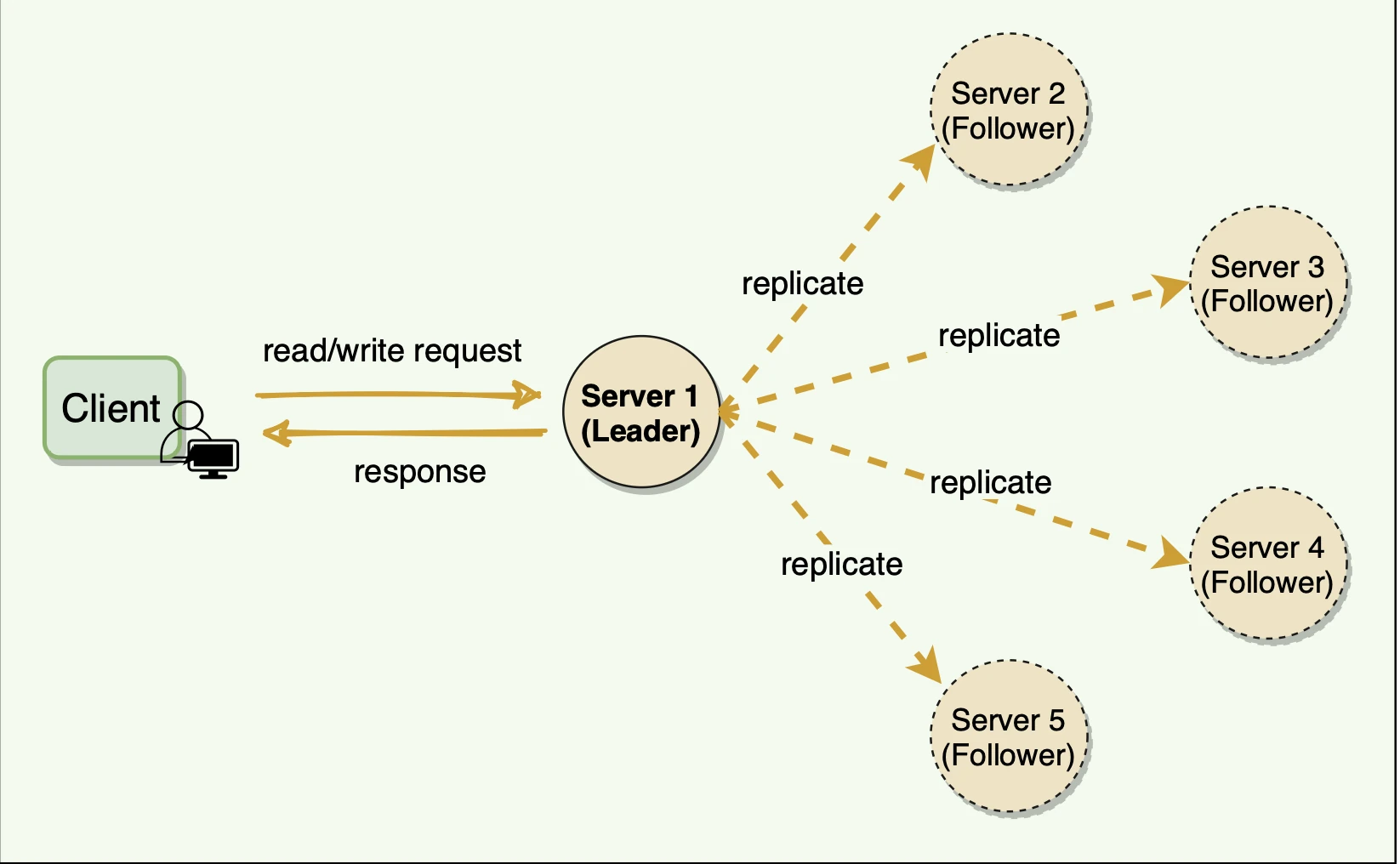
- This is a diagram of a Single leader Master Slave database replication
During high read throughput we can increase the slave database to serve reads. The queries can be processed in parallel (READ)
Reliability :
- If by some natural disaster a database is destroyed there is no problem as the database is replicated across multiple locations.
High Availability :
- We have replicated data across multiple locations. So our website is available even if a database is offline as you can access data stored in another database server.
Fault Tolerance :
Slave database goes offline : There are other slave database available so the read operations will be directed to the other healthy slave databases. Meanwhile a new slave database will replace old one.
Master goes offline : A slave database will be promoted to a new Master. All the database operations will be executed on this new master. The problem here is Slave database might not be up to date. So missing data should be recovered by some scripts.
Challenges in Database Replication
As we know that in case the leader node crashes and cannot recover, one of the followers will be elected as the new leader. Now, this new leader can be a bit behind the old leader, as there might be some transactions that have not been completely propagated before the old leader crashed
We have these old transactions in the WAL(file) on the old leader but they cannot be recovered until the old leader is live again.
So in this case the client can see some data inconsistencies, e.g., the last data that the client fetched from the old leader may not be available anymore
So, it becomes important for the leader and followers to know what part of the log is safe to be exposed to the clients.
Solution ?
We will keep track of the last log entry on the leader, which has been successfully replicated to a quorum of followers. Index of this entry → Replicated Index or High-Water Mark Index.
The leader exposes data only up to the high-water mark index.
So on each update :
Leader first writes it to WAL file and sends it to all followers
Upon receiving this request followers append it to their own WAL file and sent ack to leader.
The leader keep track of the indexes of the entry which is successfully replicated on each follower. → Replicated Index
Leader can propagate this Index to all followers as part of the Heartbeat message
Leaders and followers ensures that client can only read data upto the High-water mark index.
So even if the current leader fails and another leader is elected, the client will not see any data inconsistencies
Database Scaling (Sharding and Partitioning)
We have already seen what is Database Replication
There are 2 types of Database scaling
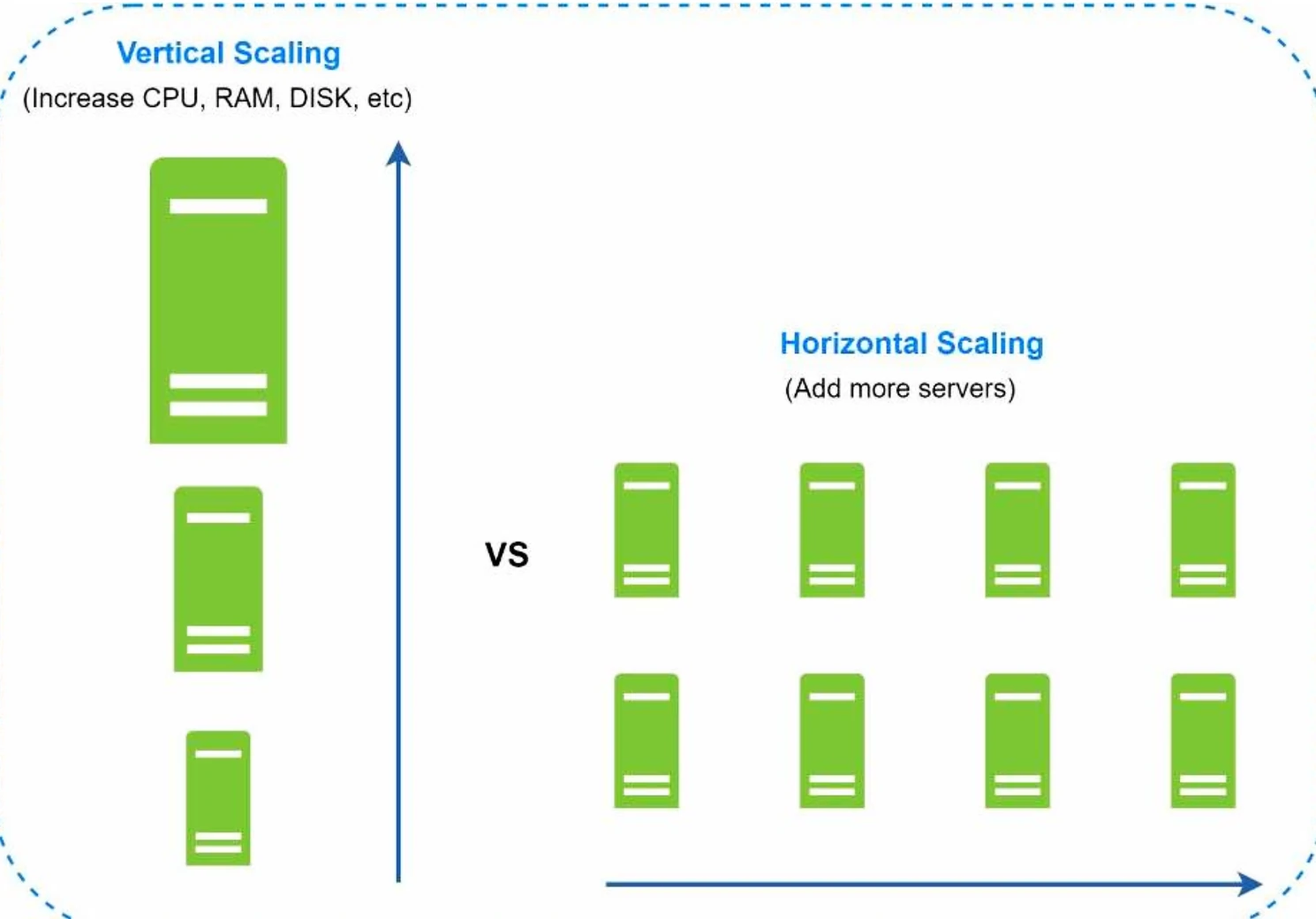
Vertical Scaling ✨
Vertical scaling, also known as scaling up, is the scaling by adding more power (CPU, RAM, DISK, etc.) to an existing machine.
There is always a hardware limit to vertical scaling.
Greater risk of single point of failures.
The overall cost of vertical scaling is high. Powerful servers are much more expensive.
Horizontal Scaling ✨
Horizontal scaling, also known as sharding, is the practice of adding more servers
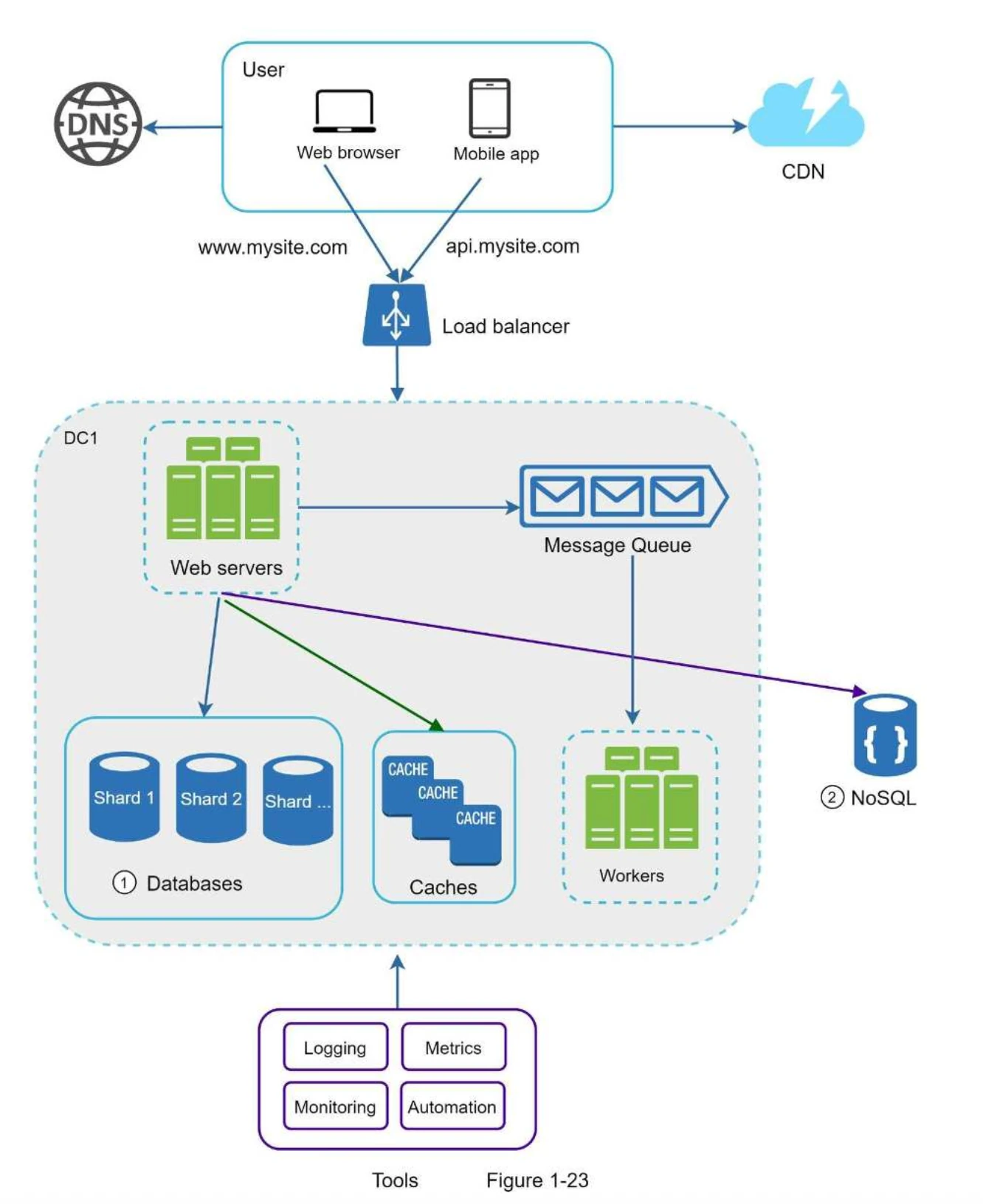
Sharding separates large databases into smaller, more easily managed parts called shards.
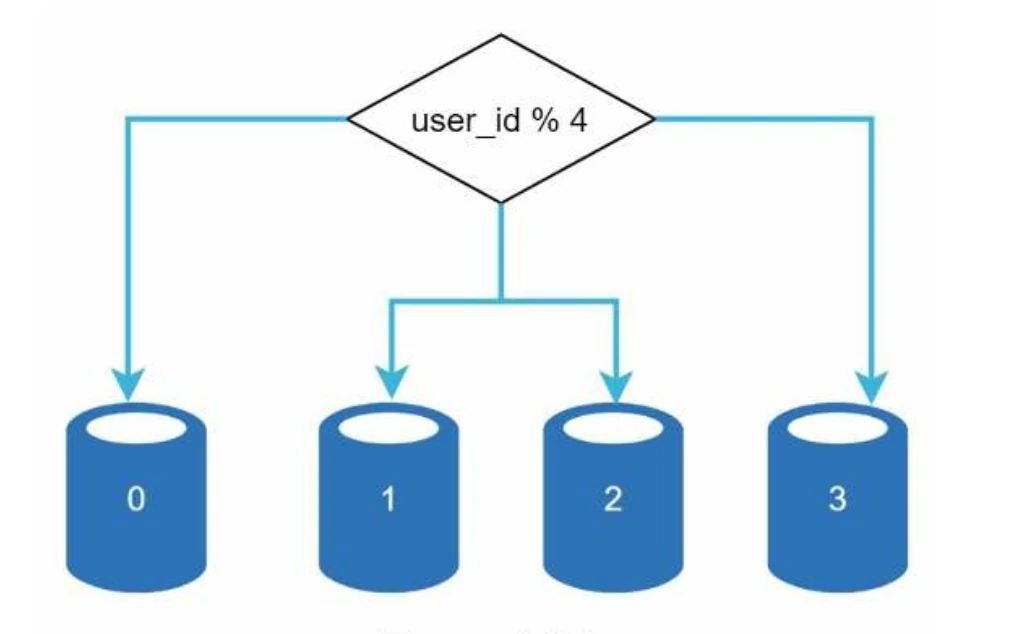
Actual data on each shard is different. One way to allocate data to a shard is by hashing (user_Id % number of shards)
The most important factor to consider when implementing a sharding strategy is the choice of the sharding key.
Sharding key (known as a partition key determines how data is distributed in shards. So you have to choose the sharding key in such a way so that there is equal distribution of data among shards. Eg : user_id in above example
### Problems with Horizontal Scaling
One of the problems that horizontal scaling creates is data coordination and aggregation among different shards. For every request you might need to query multiple shards and then coordinate and send the data (so data coordination is an overhead)
Celebrity Problem : Excessive access to a specific shard could cause server overload. Imagine data for Katy Perry, Justin Bieber, and Lady Gaga all end up on the same shard
Once a database has been sharded across multiple servers, it is hard to perform join operations across database shards
- A common workaround for this problem is to denormalize the database so that queries that previously required joins can be performed from a single table.
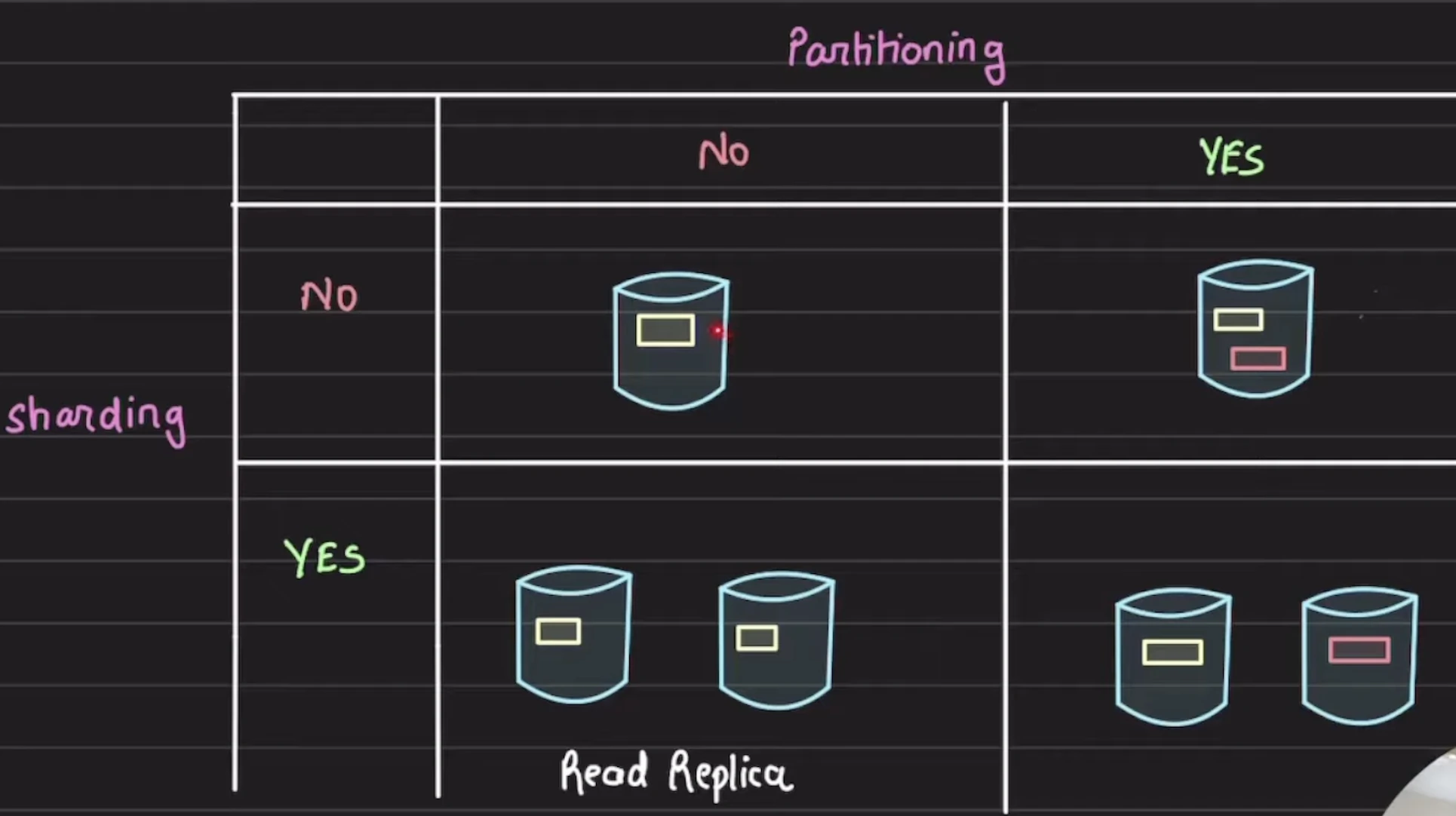
Sharding vs Partitioning
Sharding : method of distributing data across multiple machines (server).
It’s basically horizontal scaling of data across multiple servers.
Shard is at database level (shards are physical servers)
Partitioning : Splitting a subset of data within same instance
It is also known as splitting of data
Partition is at data level.
Overall a database is sharded and data is partitioned
Sharding is essentially partitioning across multiple servers
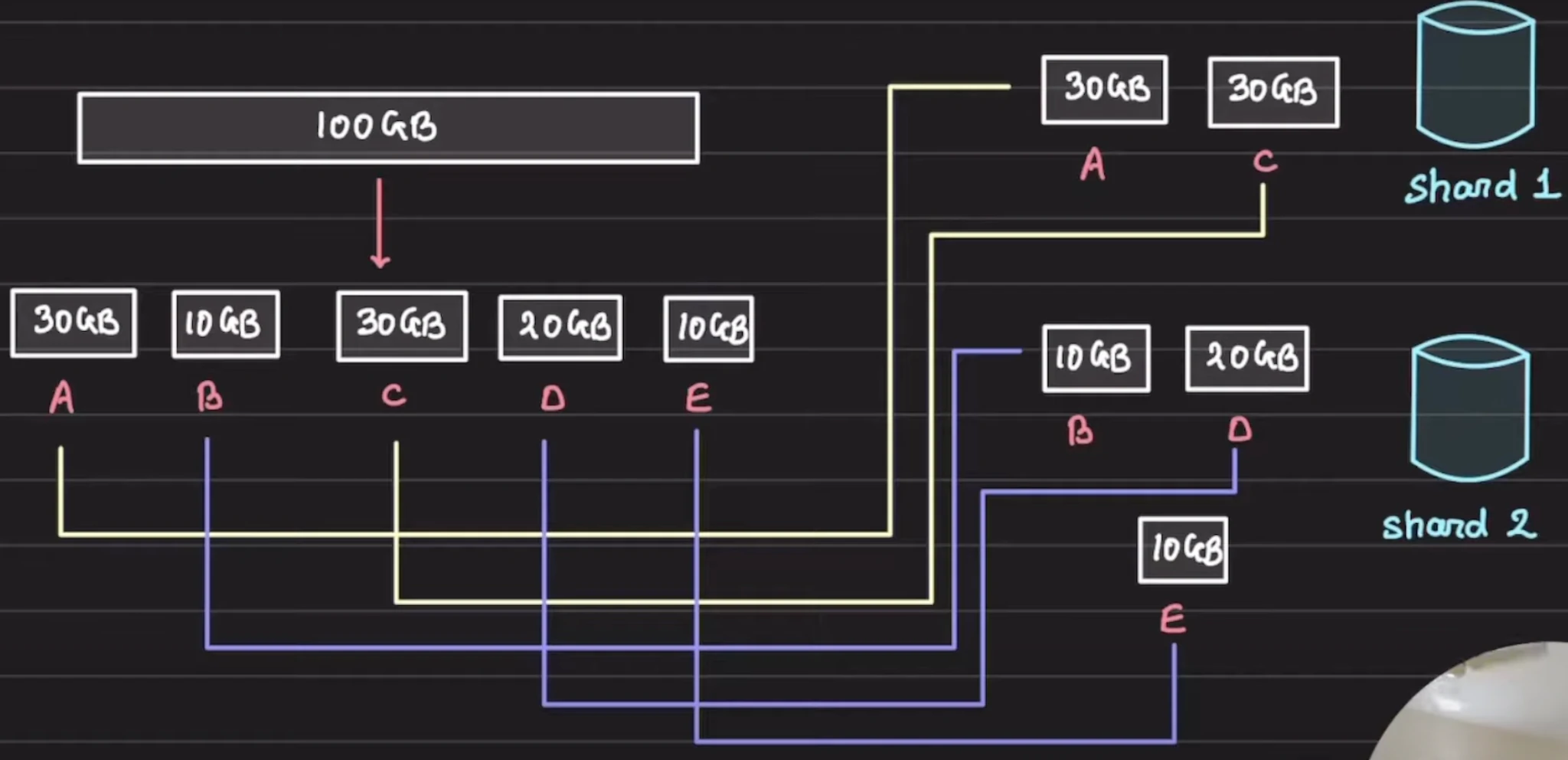
☪️It might be possible that number of partitions is not always same as number of shards. For example consider 100 GB of data that has to be divided into 5 partitions of 30GB , 10GB, 20GB, 10GB, 30GB and then these 5 partitions are stored at 2 shards
## How to choose a Database ?
Relational Database (SQL)
You need structured, tabular data with a schema.
Relational/Normalized data - changes to one table may require changes to others
E.g. adding an author and their books to different tables on different nodes
May require two phase commit! (Expensive)
You want strong consistency (ACID transactions).
- Excessively slow if you don’t need them (due to two phase locking)
You need complex joins.
Uses B-Trees
- Better for reads than writes in theory
Banking systems, booking system, ecommerce, financial records.
>> Use SQL when correctness is of more importance than speed
Document Stores (NoSQL)
MongoDB , CouchDB.
Best when dataschema is flexible.
You don’t need heavy joins..
- Eg : User Profile , Content management
Stores data in B-Trees and Transaction is supported
DynamoDB is designed for high availability at the expense of strong consistency
Wide Column Store (NoSQL)
Apache Cassandra, ScyllaDB, HBase
Has a shard key and sort key.
Indexing based on LSM trees and SSTables
Chat applications, IoT sensor data, time-series, recommendation feeds, analytics pipelines.
>> Great for application with high write volume, consistency is not as important all writes and reads go to the same shard.
Why Cassandra is ideal for heavy writes ?
Cassandra stores data in a LSM(Log structure merge tree). Here the data is first committed to a WAL(write ahead log) file and then written to an inmemory structure called memtable
It doesn’t update data in-place → Unlike traditional databases that often need to read existing data before updating it, Cassandra can perform most writes without reading first.
- Since it doesn’t update data in place (require random write) cassandra performs sequential writes which are faster than random writes.
During an update Cassandra :
Appends to commit log - All writes go sequentially to the end of a log file
Writes to memtables - In-memory structures that batch writes
Flushes to SSTables - When memtables fill up, they're written sequentially to disk as immutable files
Handles updates as new entries - Rather than finding and modifying existing data, it writes new timestamped entries
Eg : if you update a user's email address three times:
Traditional DB: Find the user record, modify it in place (random write)
Cassandra: Write three separate entries with timestamps, determine the latest value at read time (sequential writes)
TimeSeries Database (NoSQL)
InfluxDB, TimescaleDB, Prometheus. Data is mostly timestamps and metrics.
You want fast ingestion, retention policies, downsampling.
Use LSM trees for fast ingestion, but break table into many small indexes by both ingestion source and timestamp
Eg : Monitoring metrics, IoT sensors, stock market data, server monitoring
>> Great for sensor data, metrics, logs, where you want to read by the ingestor and range of timestamp
Search Engine (ElasticSearch)
Elasticsearch , Solr
You need full-text search, fuzzy search, ranking, analytics on server Logs.
Stores data in an inverted-index. Not just a DB — more a search-optimized index.
E-commerce product search, log analysis, site search, analytics dashboards.
Graph Database
Neo4J , ArangoDB
Data is all about relationships and You need to traverse deep relationships quickly.
As opposed to just using a SQL database under the hood with relations to represent nodes and edges, actually has pointers from one address on disk to another for quicker lookups
The former is bad because reads become slower proportional to the size of the index (Olog n to binary search), but using direct pointers is O(1)
Social graphs, friends on social media ,recommendation engines, network topologies, knowledge graphs.
>> Only useful when data can be represented in a graph format.
SQL vs NoSQL
| Parameter | SQL | NoSQL |
|---|---|---|
| Structure | Fixed schema | Flexible schema; unstructured data |
| Scalability | Scales vertically more naturally. Horizontal scaling needs complex sharding and data coordination. | Horizontal scaling is well supported; NoSQL is often distributed by design. |
| Property | ACID, with a focus on data integrity. ACID across nodes can make horizontal scaling slower. | Highly available; often eventual consistency. |
| When to use | Complex queries and strong correctness requirements; start from the data you need to store. | Simple access patterns, high availability, high performance, and large real-time data volumes. Time-series databases and Cassandra are strong write-heavy options. |
Data Structure and Relationships
Well-defined schema with complex relationships → SQL (PostgreSQL, MySQL)
Flexible, evolving schema or document-based → NoSQL (MongoDB)
Simple key-value lookups → Redis, DynamoDB
Time-series data → InfluxDB, TimescaleDB
Scale and Performance
Read-heavy with complex queries → SQL with read replicas
Write-heavy with simple access patterns → NoSQL (Cassandra, DynamoDB)
Need horizontal scaling from day one → NoSQL or distributed SQL (CockroachDB)
Moderate scale with strong consistency → Traditional SQL
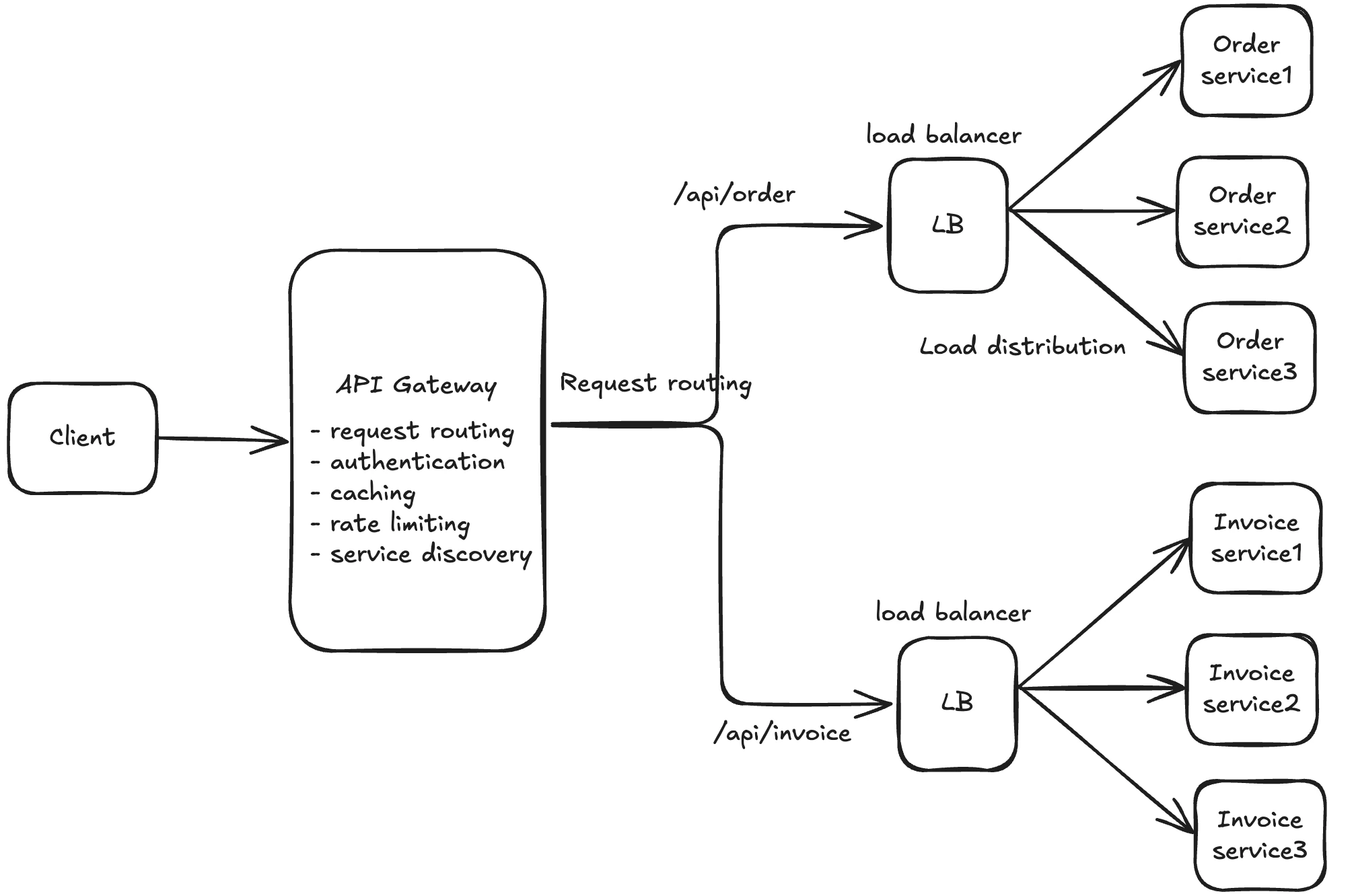
API Gateway
Your API Gateway can handle Authentication and Authorization
Client ——> API Gateway ——> Load Balancer ——> (Multiple services)
Centralized API Management
API Gateway basically accepts client requests and routes them to appropriate backend services. Also known as request routing
It’s generally used in microservice architecture where we have multiple services.
Don’t confuse this with Load Balancer.
Focus: API management, security, and service orchestration
It is generally used for :
Authentication/authorization
Rate limiting
Service Discovery
Request/response transformation, API versioning
Monitoring, caching
Load Balancer 👍
Load Balancer is responsible for distributing the incoming traffic to multiple instances of the same microservice. This is done to prevent any single server from becoming a bottleneck
They don’t have the capability to understand API requests (L4 Load balancer) and then make a decision of where to route it based on the endpoint
Focus : Traffic distribution, high availability,
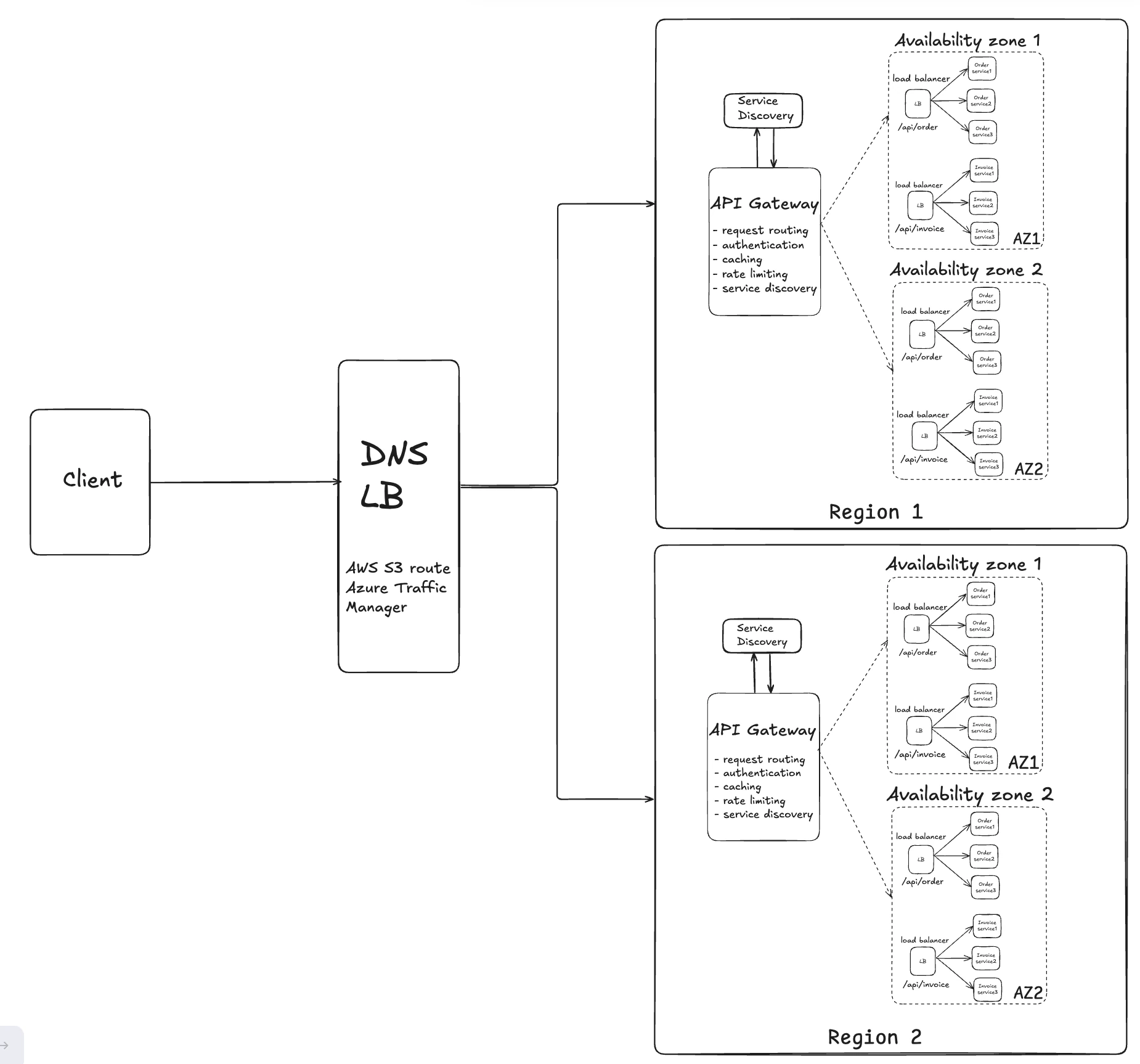
Q) API Gateway is a single endpoint. How does it handle millions of requests per sec?
How does a request coming from a user goes from DNS to API Gateway to
appropriate server ?
- API Gateway is not really a single entry point. It is divided across several availability zones and Regions.
API Gateway and DNS work together in the routing process, but they handle different aspects:
DNS Level Routing: DNS is typically where geographic/proximity routing happens first. When a user makes a request:
DNS Resolution: The DNS service (like Route 53) can use geolocation or latency-based routing policies to direct users to the closest region
Regional Selection: DNS returns the IP address of the API Gateway endpoint in the optimal region based on proximity, health checks, or routing policies
The user's request then goes to that specific regional API Gateway
API Gateway Level Routing: Once the request reaches a specific regional API Gateway:
Availability Zone Distribution: API Gateway automatically distributes traffic across multiple AZs within that region for high availability.
Backend Routing: API Gateway routes to backend services (Lambda, EC2, etc.) based on your configured routes and rules, not proximity
Load Balancers
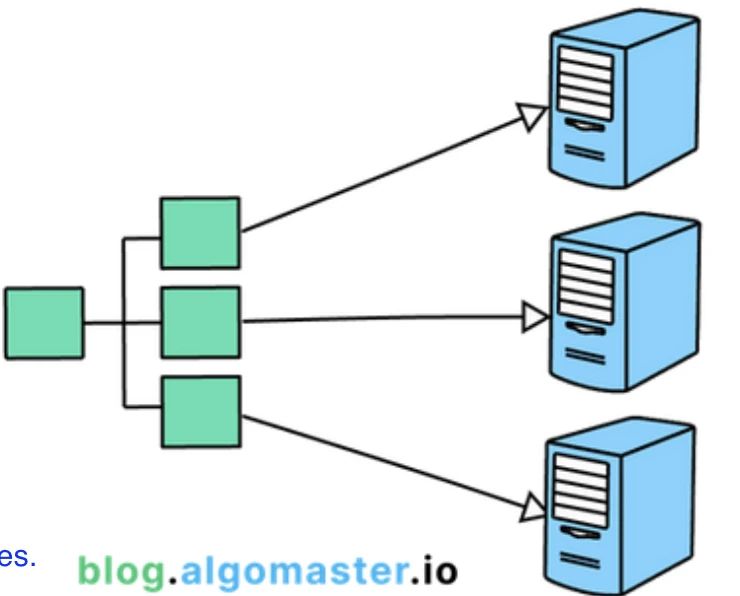
Load balancers are generally used to distribute traffic among multiple instances of same service
Ex : Ingress in kubernetes (distribute traffic among pods)
The whole idea of Load Balancer is to distribute the load so that no server is overwhelmed
We use API Gateway to route requests to appropriate services.
/users —> User Service
/orders —> Order service
Api gateway keeps track of all the services in the system
Load Balancing Strategies
Round Robin
- Distributes requests evenly in circular order.
Weighted Round Robin
Distributes requests based on server capacity weights.
Server with more weights receive more connections
Least Connections
- Sends requests to the server with fewest active connections.
Least Response Time
- Routes requests to the server with the fastest response.
IP Hash
Assigns requests based on hashed client IP address
Sticky Clients
For persistent Connections (websocket) → L4 Load balancer else L7 Load balancer
# System Design Components
CDN
A geographically distributed network of servers that delivers web content to users from the closest server location.
CDN is a type of cache. We generally use CDN to cache static media assets like images and videos.
CDN can also be used to cache dynamic content which is updated not so frequently.
The primary purpose of a CDN is to deliver content to end-users with high availability and performance by reducing the physical distance between the server and the user.
How it works:
Content (images, videos, CSS, JavaScript) is cached across multiple edge servers worldwide
When a user requests content, the CDN routes them to the nearest edge server
If content exists in cache, it's served immediately (cache hit)
If not (cache miss), the edge server fetches from origin server, caches it, then serves it
Reduces latency, bandwidth costs, and load on origin servers
Uses DNS routing and anycast to direct traffic efficiently
Proxy Servers
An intermediary server that sits between clients and backend servers, forwarding requests and responses.
How it works:
Forward Proxy: Acts on behalf of clients, hiding client identity from servers (e.g., VPNs)
Reverse Proxy: Acts on behalf of servers, hiding server details from clients (e.g., load balancers, NGINX)
Client sends request to proxy
Proxy may cache responses, filter requests, log traffic, or modify headers
Proxy forwards request to destination server
Response flows back through proxy to client
Benefits include security, caching, load balancing, and SSL termination
CheckSums
A checksum is a unique fingerprint attached to the data before it’s transmitted.
When the data arrives at the recipient’s end, the fingerprint is recalculated to ensure it matches the
original one
Implements data reliability/integrity
If the checksum of a piece of data matches the expected value, you can be confident that the data hasn't been modified or damaged.
Used in file transfers, databases, network protocols, and distributed storage
Common in detecting bit flips, network errors, or malicious modifications
When a system is storing some data, it computes a checksum of the data, and stores the
checksum with the data. When a client retrieves data, it verifies that the data it received
from the server matches the checksum stored.
Example : HDFS and Chubby store the checksum of each file with the data.
Heartbeat
A heartbeat is a periodic message sent from one component to another to monitor each other's health and status
- Implements availability monitoring / Detects Failure in the system
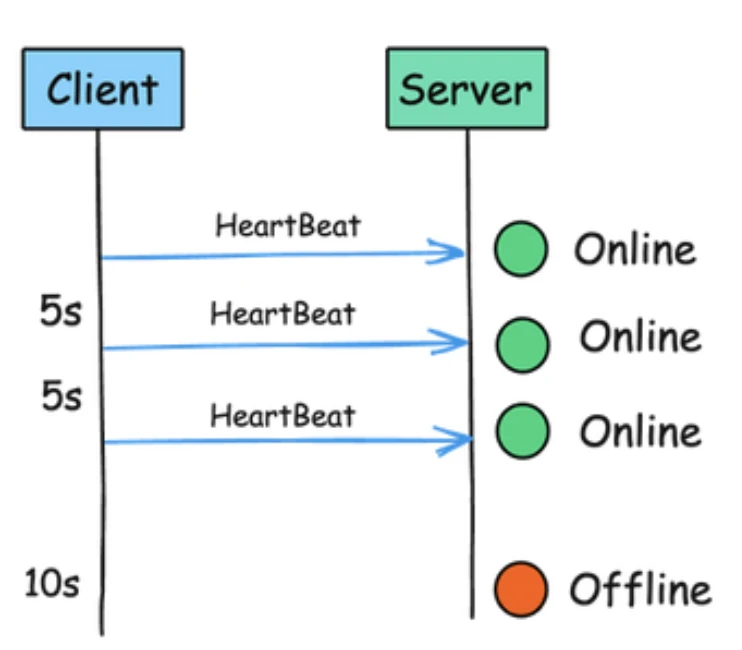
- Used in leader election, health checks, and failover mechanisms
Heartbeat enables quick failure detection without waiting for actual request failures
Can be push-based (sender actively sends) or pull-based (receiver actively checks)
In a distributed system when a server receives a request it needs to know what other servers are alive and working so that it can efficiently route requests.
If there is a central server, all servers periodically send a heartbeat message to it. If there is no
central server, all servers randomly choose a set of servers and send them a heartbeat message
every few seconds
- So if no heartbeat message is received from a server for a while, the system can suspect that the
server might have crashed. And can start working on its replacement.
Example : GFS: The leader periodically communicates with each ChunkServer in HeartBeat messages
Service Discovery
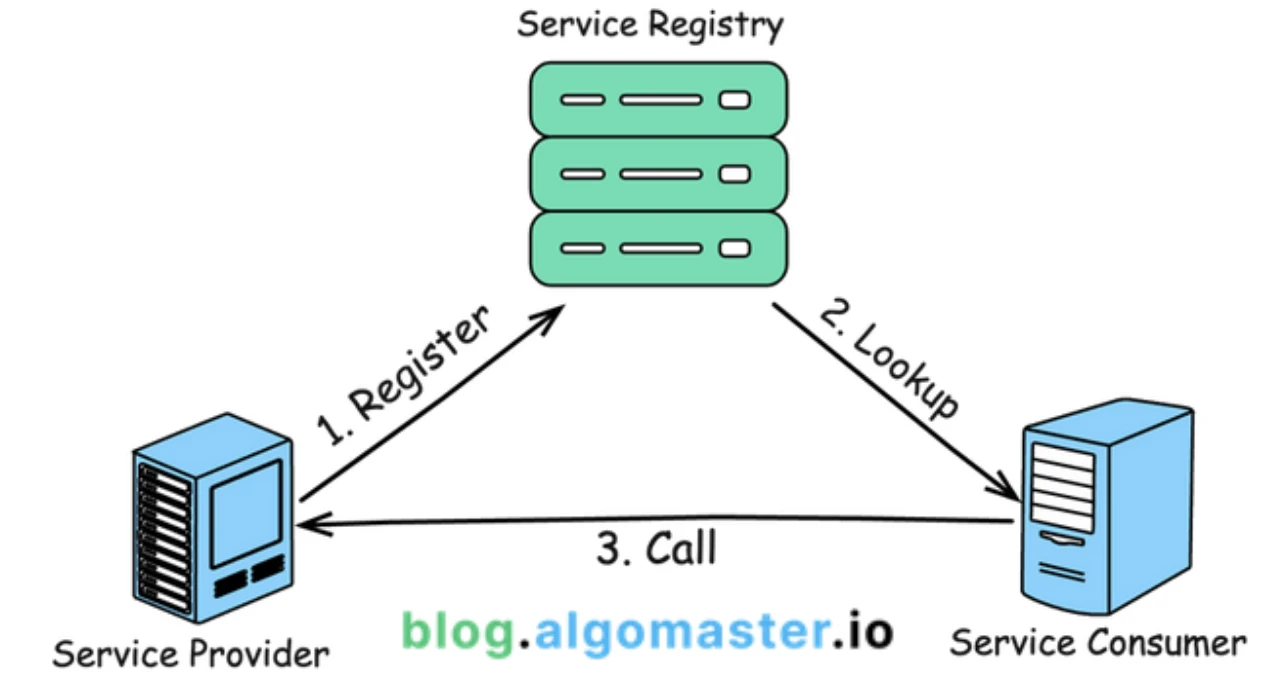
- Service discovery is a mechanism that allows services in a distributed system to find and communicate with each other dynamically.
It hides the complex details of where services are located, so they can interact without knowing each other's exact network spots.
Enables scalability and reliability
How it works:
Service Registration: Services register themselves with a registry (like Consul, etcd, Zookeeper) on startup, providing hostname, port, and health check endpoint
Registry: Central database maintains list of available services and their locations
Service Lookup: Client queries registry to find available instances of needed service
Health Checking: Registry periodically checks service health, removing unhealthy instances
Load Balancing: Client selects from available instances using strategies like round-robin
Enables automatic scaling, failover, and eliminates hardcoded service locations
Bloom Filters
A space-efficient probabilistic data structure that tells whether an element is may be in a set, or definitely is not.
It is basically used to avoid unnecessary searching. Like generally for search you would query a database which looks for the data on disk (slow).
Bloom filters don't store the data; it only stores one bit sized array for all the words. It uses multiple hash function to fill that array.
How it works:
To start with you have a m-bit array (more bit less crowding). And K independent hash functions. Each hash function gives you a position in the bit array.
When you want to add a word in the array so pass it to all the K hash functions and set the output bits to 1.
And when you have to check whether an element is present in a set or not just pass that to all the hash functions and compare whether the output bits are set or not.
If any bit is 0: element definitely NOT in set
If all bits are 1: element probably in set (might be false positive)
Space-efficient: uses much less memory than storing actual elements
Used for caching decisions, database query optimization, and spam filtering
Trade-off between space, false positive rate, and number of hash functions
Gossip Protocol
Gossip Protocol is a decentralized (p2p) communication protocol where nodes randomly share information with each other, spreading updates throughout the network like gossip.
It is inspired by the way humans share news by word-of-mouth, where each person who learns the information shares it with others, leading to widespread dissemination.
Basically it is used in a distributed env where we don’t have a central node to keep track of every other node. So each node keeps track of other nodes in the cluster and gossips (share) this information to a random node every sec.
So eventually each node knows the state of every other node
How it works :
Initialization
- A node in the system starts with a piece of information, known as a “gossip”
Gossip Exchange
- At regular intervals, each node randomly selects another node and shares its current gossip. The receiving node then merges the received gossip with its own.
Propagation
- The process repeats, with each node spreading the gossip to others.
Convergence
- Eventually, every node in the network will have received the gossip, ensuring that all nodes have consistent information.
Eventually consistent: all nodes converge to same state
Highly resilient to failures: no single point of failure
Used in distributed databases (Cassandra), service meshes, and cluster membership
Used in Cassandra for failure detection
Node A detects Node B is down
Node A gossips to Node C
Node C tells other nodes and so on.. so all nodes know now B is down and requests to B are routed
Variants include push (send updates), pull (request updates), and push-pull
Blob Storage
Sometimes you'll need to store large, unstructured blobs of data. This could be images, videos, or other files. Storing these large blobs in a traditional database is both expensive and inefficient
Instead, you should use a blob storage service like Amazon S3 or Google Cloud Storage.
These platforms are specifically designed for handling large blobs of data, and are much more cost effective than a traditional database
Usually store the images / file in the blob storage and the metadata(with blob url ) in the database.
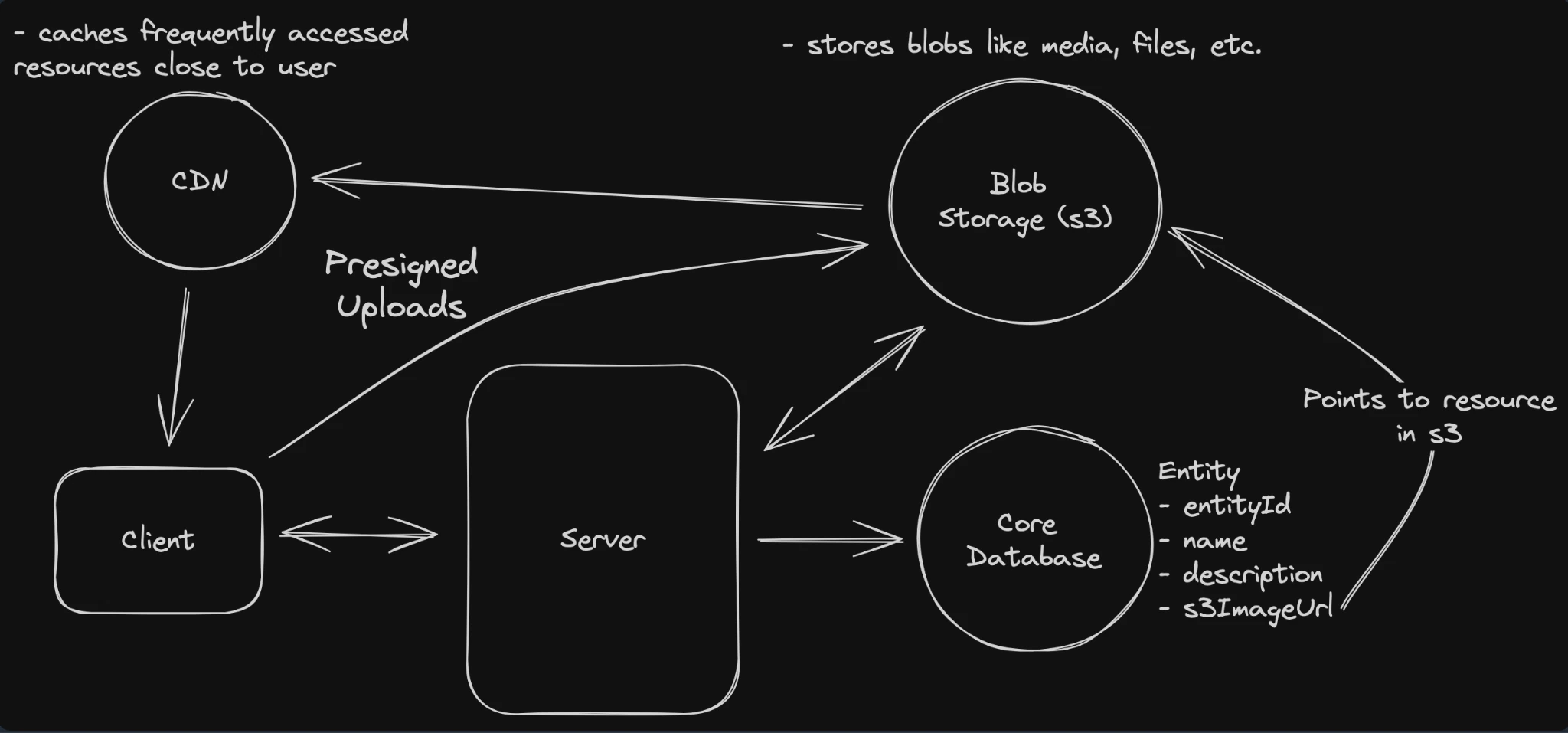
To upload:
When clients want to upload a file, they request a presigned URL from the server.
The server returns a presigned URL to the client, recording it in the database.
The client uploads the file to the presigned URL.
The blob storage triggers a notification to the server that the upload is complete and the status is updated.
To download:
The client requests a specific file from the server and is returned a presigned URL.
The client uses the presigned URL to download the file via the CDN, which proxies the request to the underlying blob storage.
Detailed Concepts
Distributed Locking
Distributed locking is a mechanism to coordinate access to shared resources across multiple servers/processes in a distributed system. It ensures that only one process can access a critical resource at a time, even when processes are running on different machines.
Distributed locks are perfect for situations where you need to lock something across different systems or processes for a reasonable period of time.
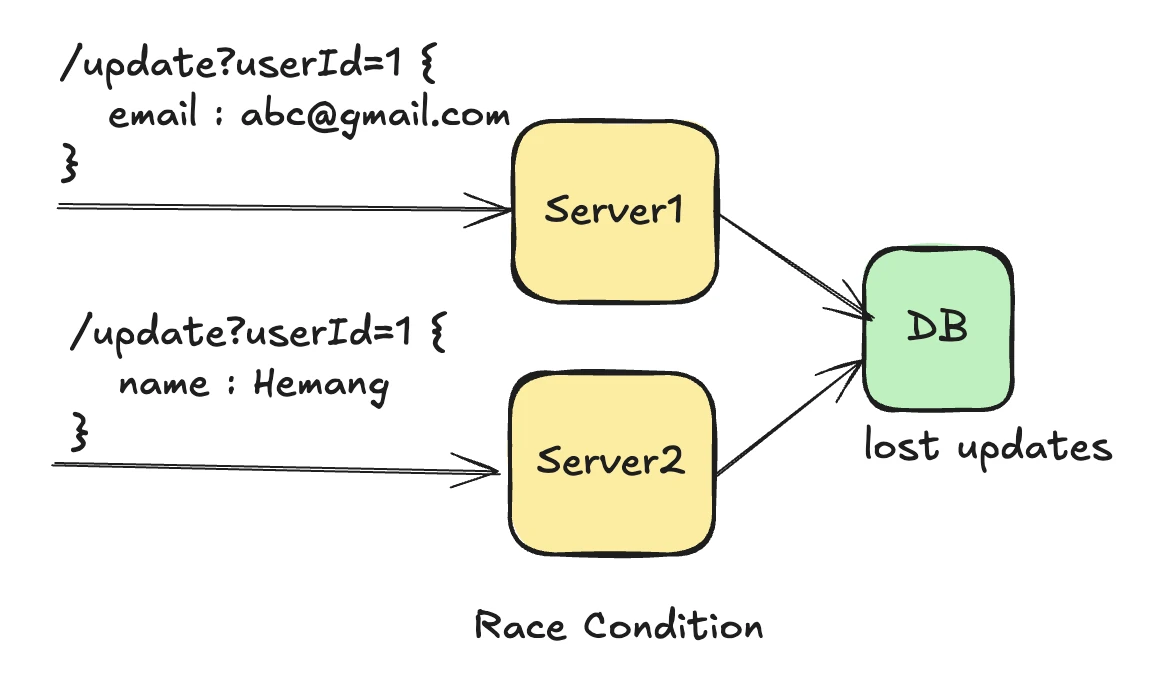
Suppose we have scaled our application across multiple servers and both servers are sharing a shared database.
Server1 receives an update for userId=1 , update email → abc@gamil.com
Server2 at the same time receives an update for same userId=1 , update name → Hemang
This will create a race condition at the database level , ideally both updates should work fine not overriding each other updates, but here we can loose updates
How would you achieve Distributed Locking ?
Database Locking 👍
Acquire a lock with an atomic operation
ACID guarantees,This approach is simple but creates a single point of failure and can become a bottleneck.
Cons: Database load, potential deadlocks, slower than in-memory
INSERT INTO locks (resource_name, holder_id, acquired_at, expires_at)
VALUES ('my_resource', 'node_1', NOW(), NOW() + INTERVAL 30 SECOND)
ON CONFLICT DO NOTHING
Redis Lock -> Reddision
You can use the tryLock() method from the Reddison Rlock interface.
Redisson RLock is a distributed implementation of java.util.concurrent.locks.Lock interface that works across multiple JVMs using Redis as the coordination mechanism.
Here
waitTime – the maximum time to aquire the lock,
leaseTime – lease time
Returns true as soon as the lock is acquired. If the lock is currently held by another thread in this or any other process in the distributed system this method keeps trying to acquire the lock for up to waitTime before giving up and returning false.
If the lock is acquired, it is held until unlock is invoked, or until leaseTime have passed since the lock was granted - whichever comes first.
It solves the problem of deadlocks with this lease time , also this is in memory so it is fast.
boolean tryLock(long waitTime, long leaseTime, TimeUnit unit) throws InterruptedException;Consensus Based Locking
- Zookeeper.
# Create ephemeral sequential node
zk.create("/locks/payment:123/lock-", ephemeral=True, sequence=True)
# Lowest sequence number gets the lock
How does RLock work ?
Suppose 2 concurrent request comes in to update userId = 1 with different updates, if there were no locking then both request will try to update the DB leading to lost updates
Now we have established RLock (Redisson lock)
Server 1: redisson.getLock("userId_1")
Server 2: redisson.getLock("userId_1")
Step 2: Both try to acquire lock (execute Lua script)
-- This Lua script executes atomically in Redis
if (redis.call('exists', 'userId_1') == 0) then
  redis.call('hset', 'userId_1', 'thread-uuid-1', 1)
  redis.call('pexpire', 'userId_1', 30000)
  return nil -- Success
end
return redis.call('pttl', 'userId_1') -- Return remaining TTL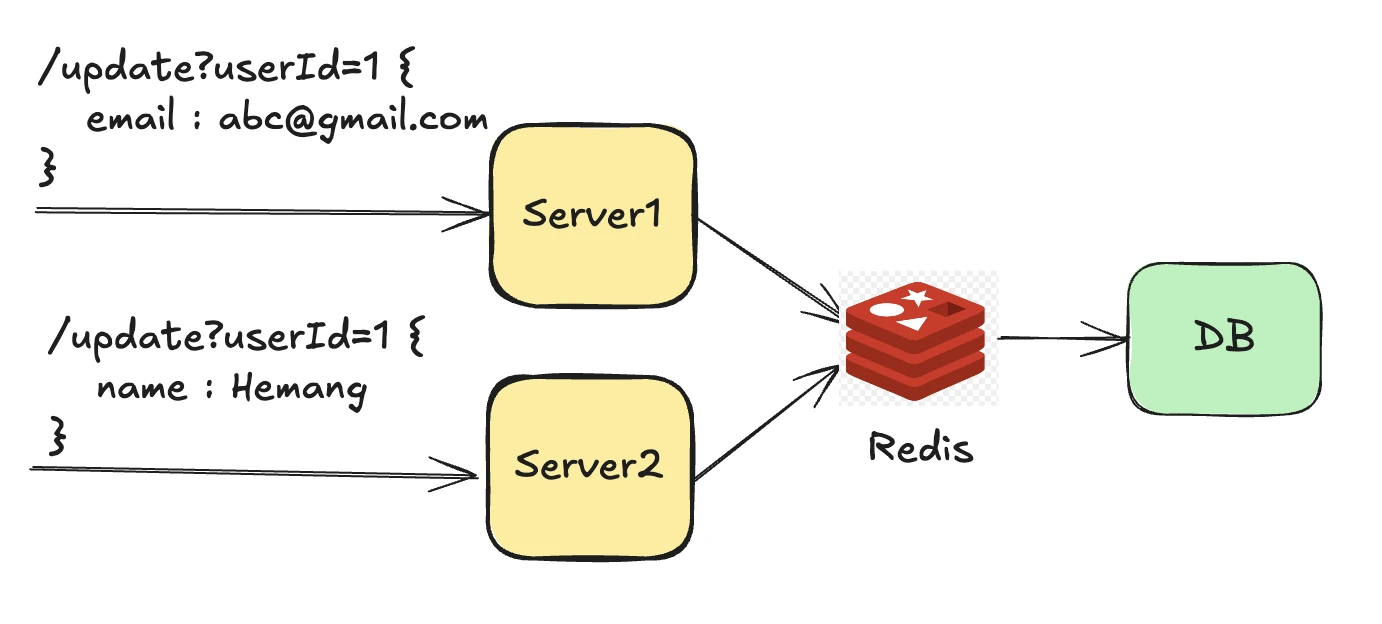
What happens:
Redis processes these requests sequentially (single-threaded)
First request (let's say Server 1) executes the script → Gets lock
Second request (Server 2) executes the script → Gets remaining TTL (lock denied)
Server 2 Behaviour
Server 2: Lock denied → Subscribe to channel "redisson_lock__channel__{userId_1}"
Server 2: Wait for notification or timeout
When Server 1 releases lock
Server 1: lock.unlock() → Deletes key + publishes to channel
Server 2: Receives notification → Tries to acquire lock again
TIMELINE
Time 0: Both requests hit Redis simultaneously
Time 1: Redis processes Server 1's request → Lock granted
Time 2: Redis processes Server 2's request → Lock denied
Time 3: Server 2 subscribes to notification channel
Time 4: Server 1 completes work → Releases lock
Time 5: Server 2 gets notification → Tries again → Success
What happens with Multiple Redis Instances (Distributed Cache) ?
Now we have seen how redis solves the problem of distributed locking. But what if
One of our Redis instance goes down ?
We have a large amount of load / traffic
We will have to scale this instance locally….Have multiple Redis instances 👍
Redis 1: 192.168.1.10
Redis 2: 192.168.1.11
Redis 3: 192.168.1.12
Now both server tries to acquire a lock
Server 1: Try lock on all 3 Redis instances
Server 2: Try lock on all 3 Redis instances
Server 1 tries:
Redis 1: ✅ Success
Redis 2: ✅ Success
Redis 3: ❌ Timeout/Failure
Result: 2/3 = Majority → Lock acquired
Server 2 tries:
Redis 1: ❌ Already locked
Redis 2: ❌ Already locked
Redis 3: ✅ Success
Result: 1/3 = No majority → Lock denied
> So Only ONE server can hold the distributed lock at a time In this case
Server 1 holds the lock → Server 1 writes to database
This solves the problem for 👍
High availability :
- Redis 1 goes down → Still have Redis 2 & 3 → Locks still work
Load Distribution
- Lock requests → Distributed across 3 Redis → Better throughput / faster
So essentially multiple redis instances are just distributing the locking mechanism across multiple machines to ensure that even if some Redis nodes fail, the locking system continues to work.
Remember → The Redis cluster is just a coordination layer - the actual data updates all go to the same database that all app servers share.
Redis only holds temporary lock information, not your business data
Database Locking
Shared Lock (S) / Read Lock.
Shared lock allows multiple transactions to read a data item but not modify it
Multiple readers can share the lock. But no one can write until all readers release their locks.
Exclusive Lock (X)
An exclusive lock allows a transaction to both read and write a data item — but only one transaction can hold it.
So full control no sharing

Isolation Levels in Database
When multiple transactions are happening in parallel each transaction feels like it is working alone. OR Isolation ensures that concurrently executing transactions do not interfere with each other, preventing data inconsistencies
Database systems typically implement isolation using mechanisms like locking (shared and exclusive locks) so that multiple transactions can access and modify the same data simultaneously without leading to erroneous results
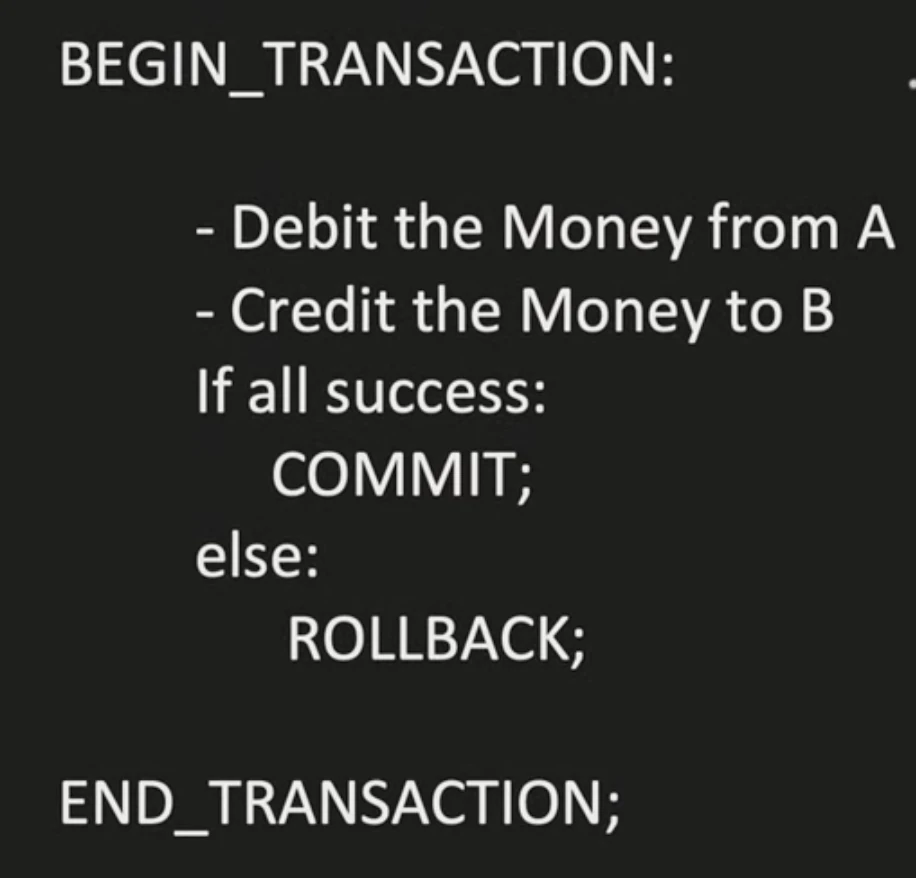
Transaction ?
- It’s basically a sequence of DB operations. And until the transaction commits its temporary and can be rolled back. So in the below example Debit Money from A debits the money from A and updates the database but if something fails then the entire transaction is rolled back. A transaction is only successful once COMMIT is done.
Current Problems in database system
Dirty Read
- This occurs when a transaction reads data written by another uncommitted transaction.
Example:
T1: UPDATE account SET balance = 500 WHERE id = 1;
T2: SELECT balance FROM account WHERE id = 1; → sees 500
T1: ROLLBACK; -- the update never really committed / happened
T2: reads data that never truly existed → dirty read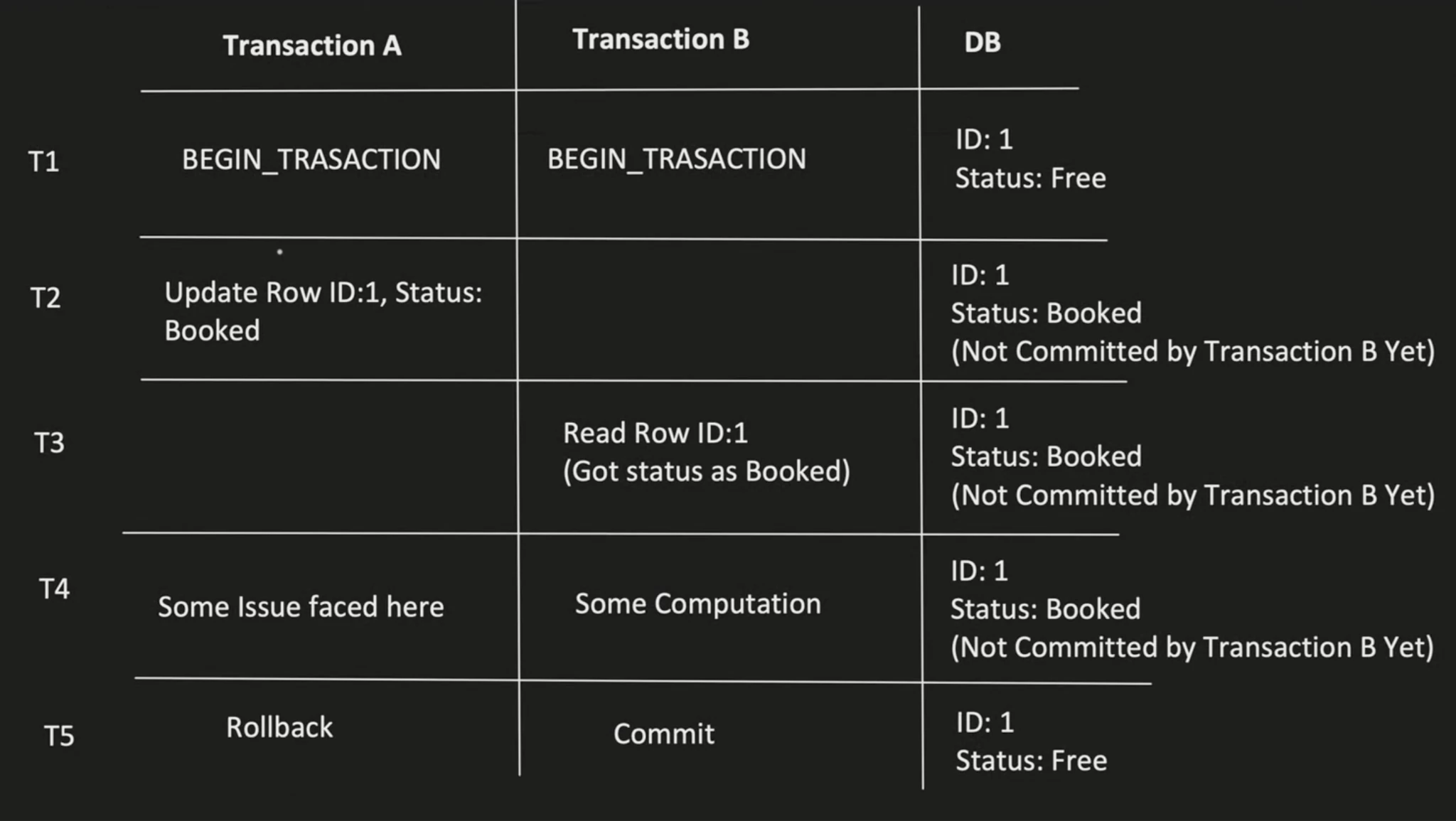
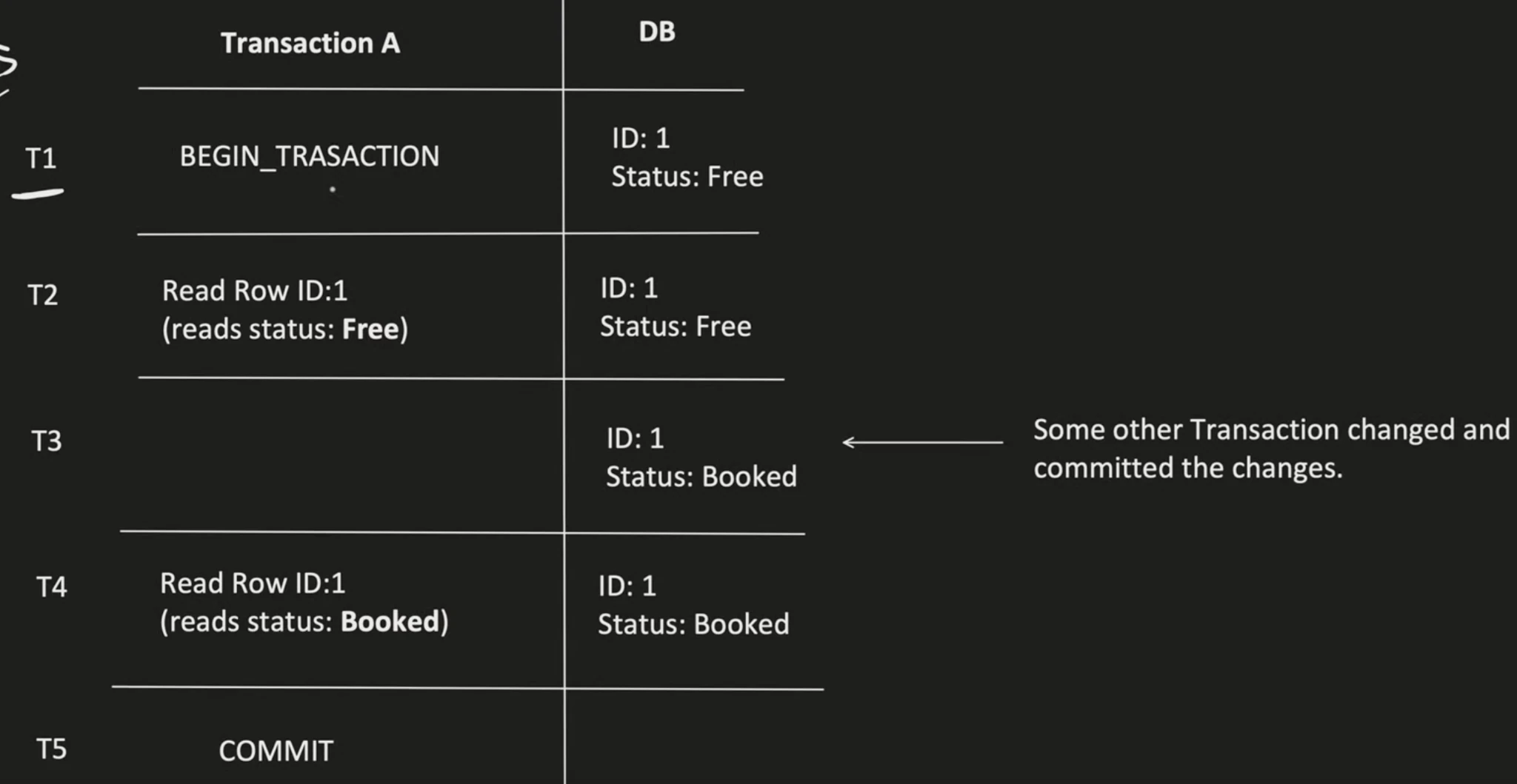
Non-Repeatable Read
- This happens when a transaction reads the same row twice and gets different values because another committed transaction modified it in between.
Example:
T1: SELECT balance FROM account WHERE id = 1; → 1000
T2: UPDATE account SET balance = 500 WHERE id = 1; COMMIT;
T1: SELECT balance FROM account WHERE id = 1; → 500
T1 got two different results in the same transaction.
How to Resolve ?
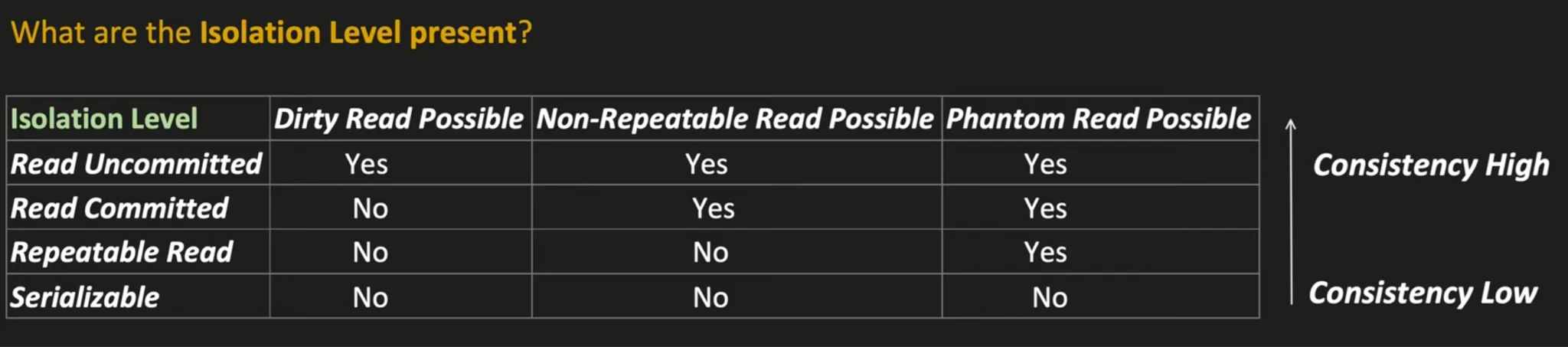
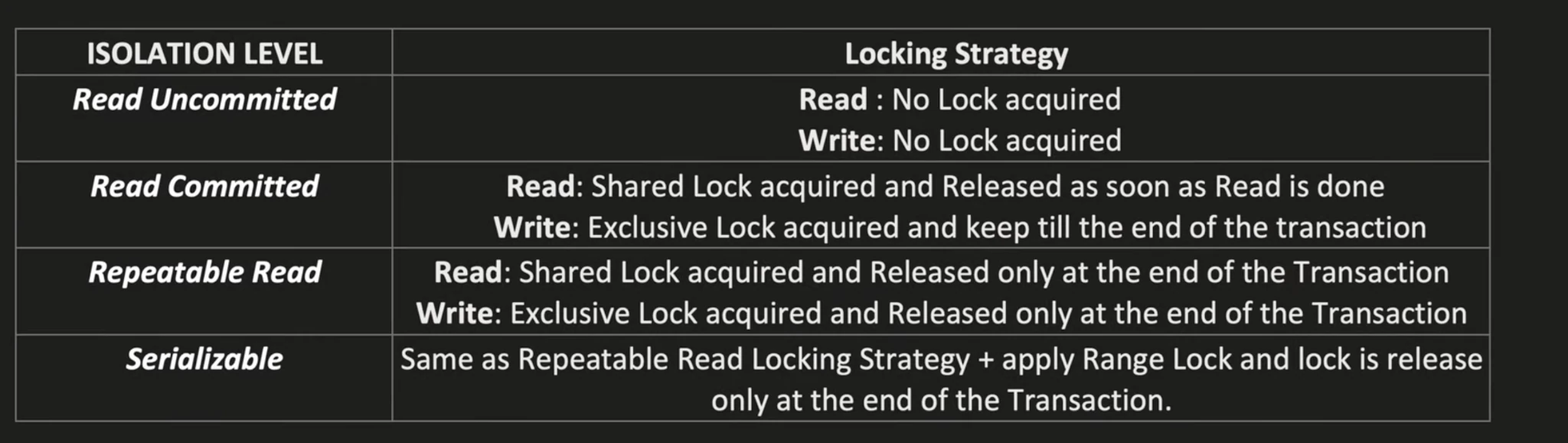
### Optimistic and Pessimistic Concurrency Control / Locking
Optimistic Locking
Assumption: Conflicts are rare — so don’t lock anything while doing work.
Transaction starts – reads data without locking.
Does local changes in memory or temp area.
Before committing, it checks: “Did anyone change this data since I read it?”
If yes → rollback
If no → commit
Isolation level → Above repeatable Read..
This is typically done by checking a version number or a timestamp on the row.
This approach is really good as it has high concurrency and no lock contention (waiting) but there can be many rollbacks and there is overhead of validating a version
Typically used for applications with many reads and few writes.
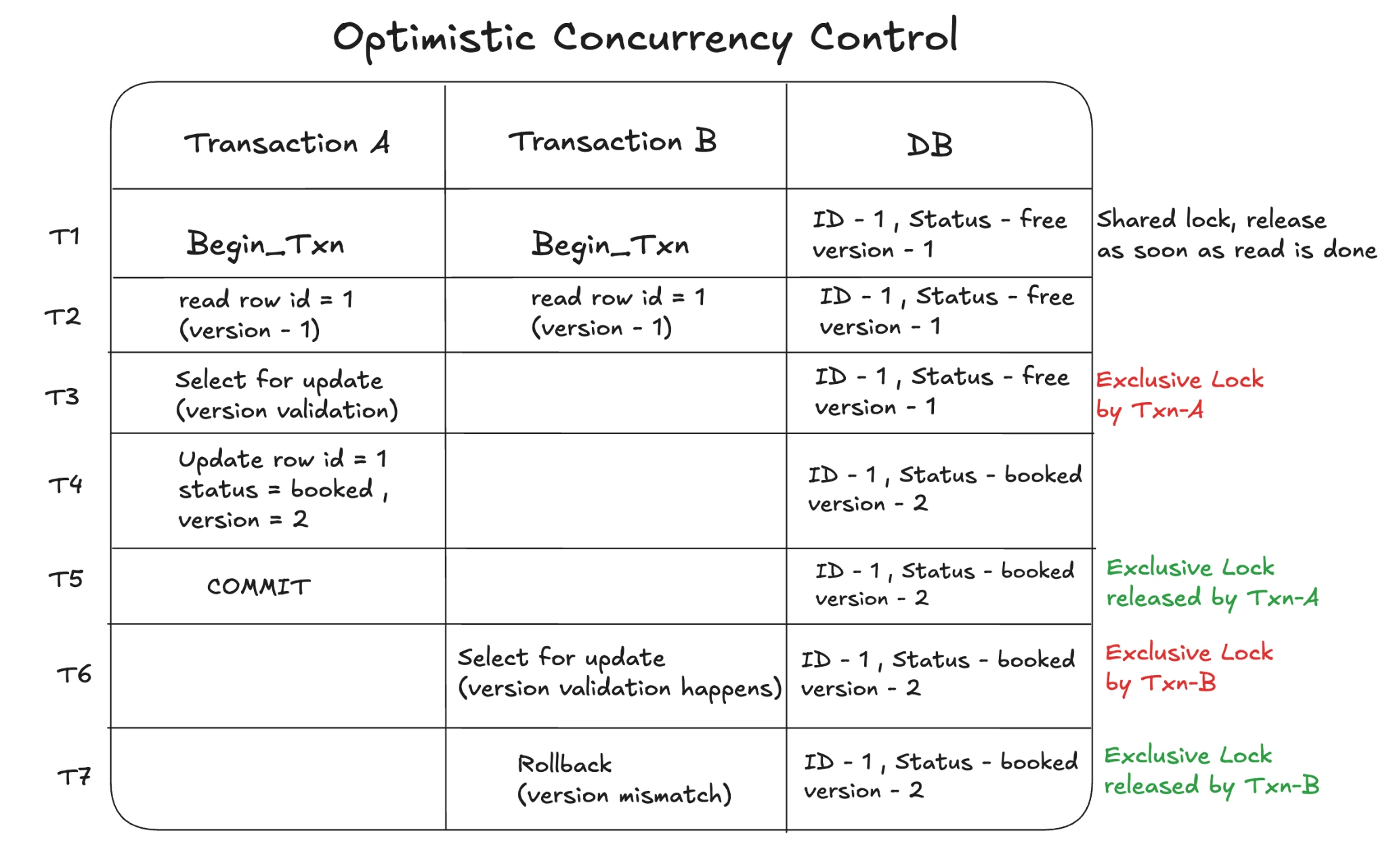
Pessimistic Locking [ 2 Phase Locking ]
Chooses Isolation levels of Repeatable reads or Serializable
Assumption
Conflicts are common — so lock data early to prevent others from modifying it.
Transaction starts
Immediately locks the data (shared for read or exclusive for write)
Other transactions trying to access the same data are blocked
Commit or rollback releases the lock
Isolation level includes Repeatable read and Serializable.
Typically good for application with many writes or where data integrity is critical
Example: Banking systems, ticket booking, inventory systems
This prevents conflicts entirely. But it can lead to deadlocks and long waiting hours.
Also lower concurrency than OCC.
Database Indexing
So how do we store data basically ??
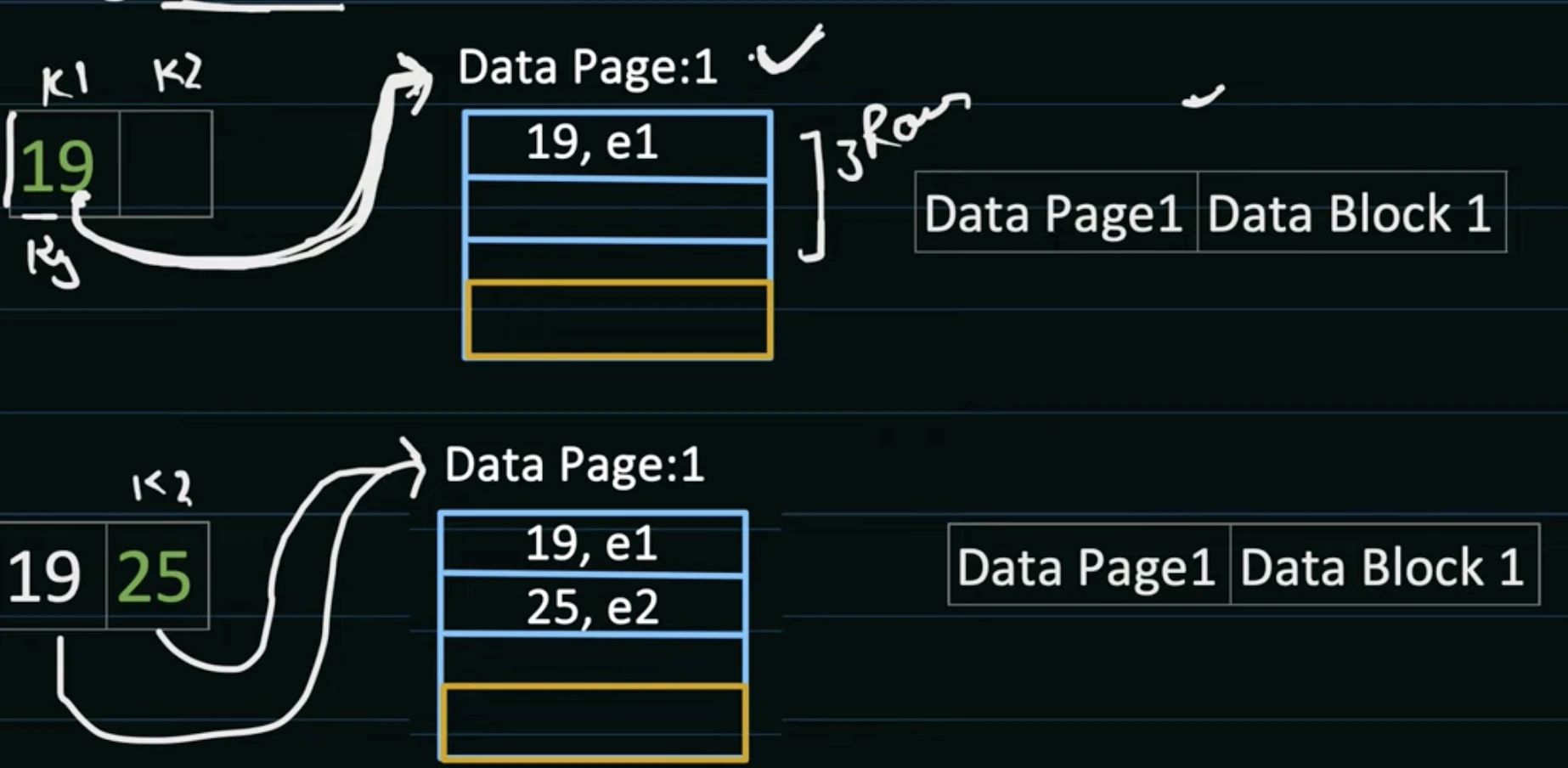
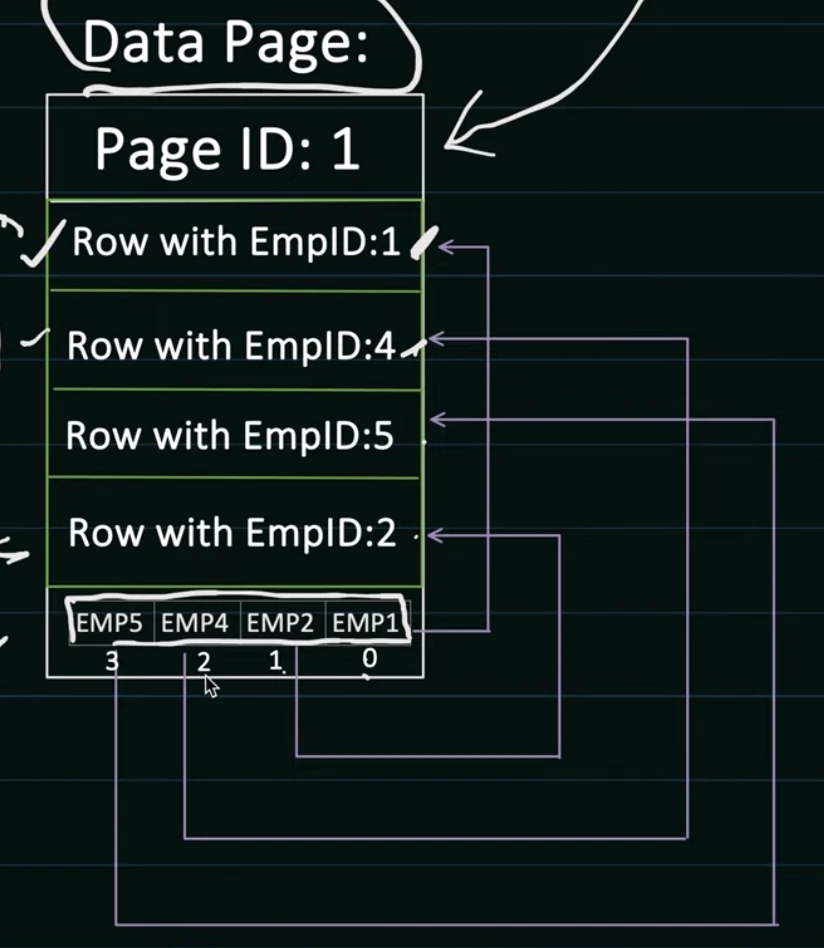
DBMS creates Data Pages which are generally 8KB in size but can vary depending upon the db to db. Each data page can store multiple table rows in it.
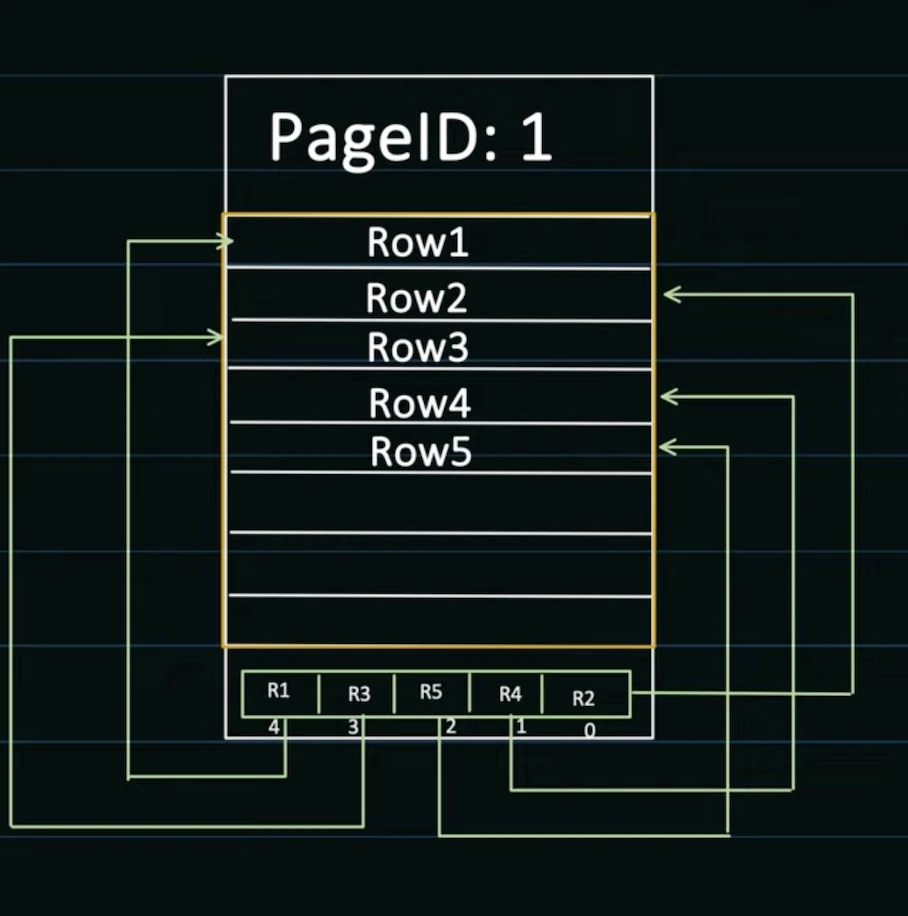
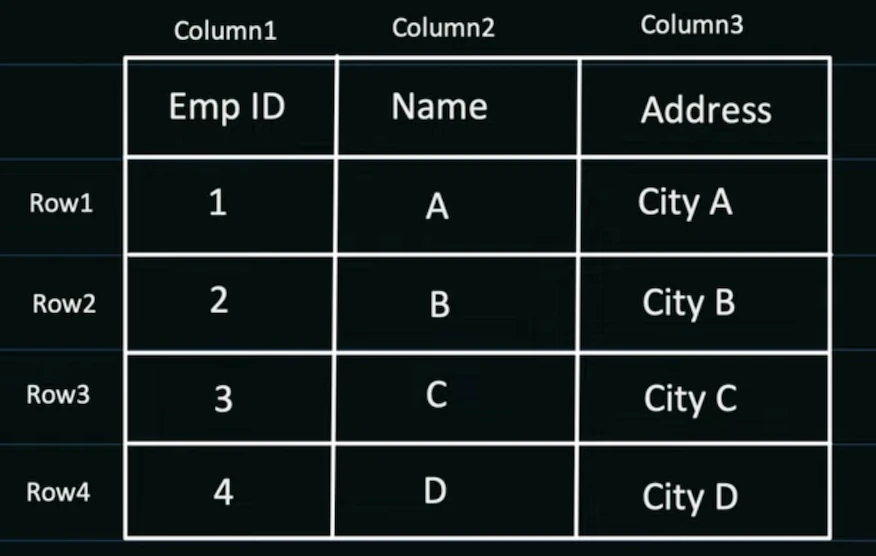
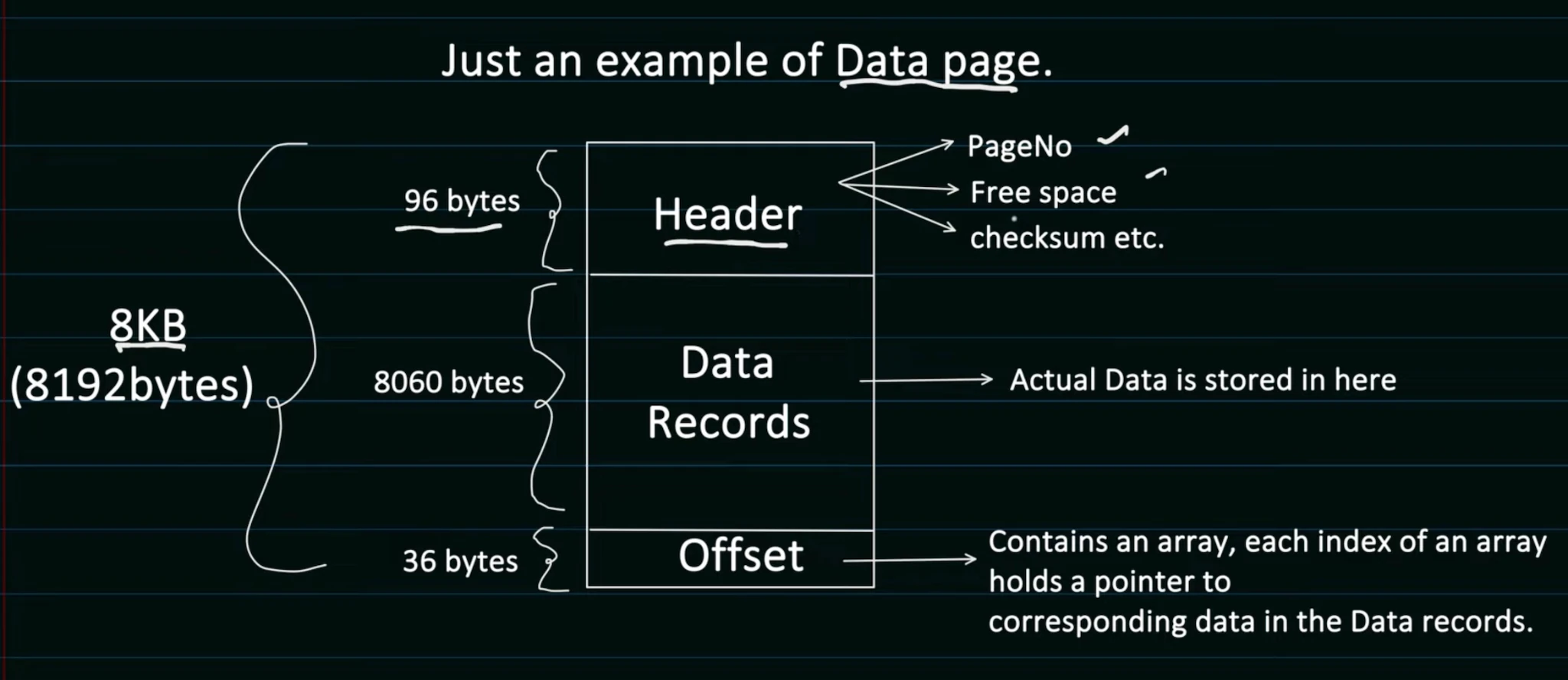
- Each Data Page consists of Header , Offset and Data Record.
So let’s say 1 table row is 64 bytes then one data page can hold ~ 125 DB rows.
So DBMS is responsible for creating and managing these Data Pages. And for storing one table data it can create many data pages.
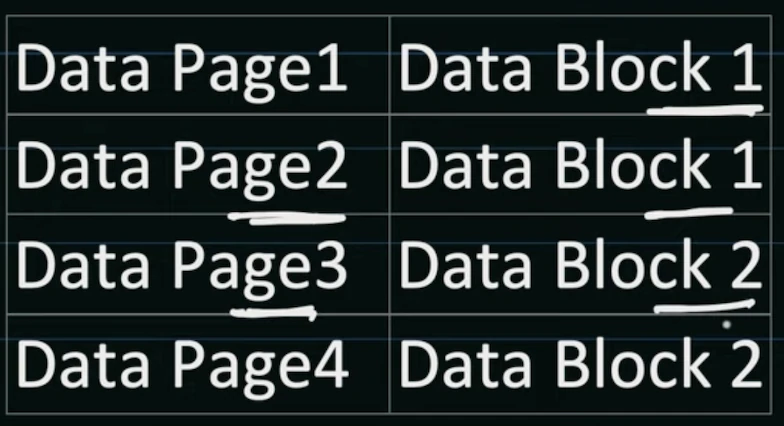
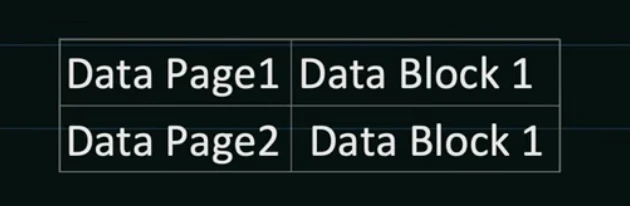
- These data pages ultimately gets stored in Data Blocks in physical memory like disk
Data Block ?
Minimum amount of data that can be read /write by an I/O operation
It’s not managed by DBMS, rather it’s managed by an underlying storage system like a disk. Data Block size can range from 4kb → 32 kb (commonly ~8KB). So for 8KB size a single data block can hold one data page.
DBMS maintains these mappings of data page to block
- DBMS can only control Data pages or what row goes in which page,or sequence of pages. But DBMS has no control over storing data blocks on disk…
DataBase Indexing
- The whole point of indexing is to increase performance of database queries. So that data can be pulled faster. Without indexing DBMS has to iterate every row of every table and find the requested data. This can take O(N) time , and if there are millions of rows this is very expensive.
But how do we increase query performance ?
By storing data in such a way so that retrieval is efficient. We sacrifice a bit on write requests so that we store data in a way that makes searching fast. The data structure that we use to store data is called B+ Trees.
B+ trees take O(LogN) time for insertion searching and deletion.
B+ Trees is also kn/as Balanced Trees
It maintains sorted data at same node
All Leaf are at the same level.
M order B tree means each tree can have at most M children and M-1 keys per node.
The tree should be balanced :
- For all nodes height(left_subtree) == height(right_subtree)
All insertions happen at leaf nodes first…
Let’s see some examples 👍
Store these in a 3-order B Tree → 9 , 33 , 75, 41, 98, 214, 126, 55 72
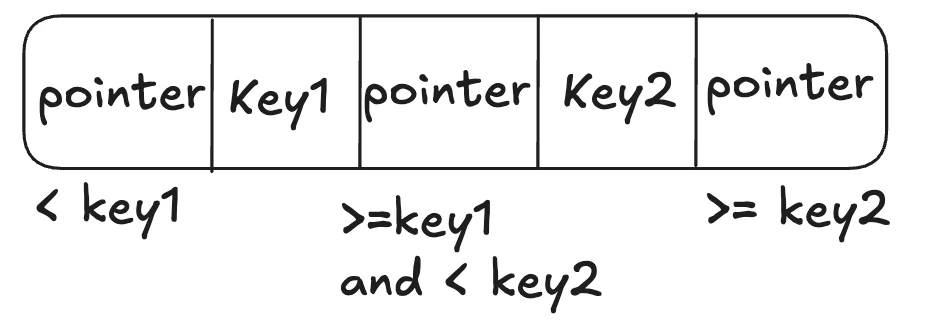
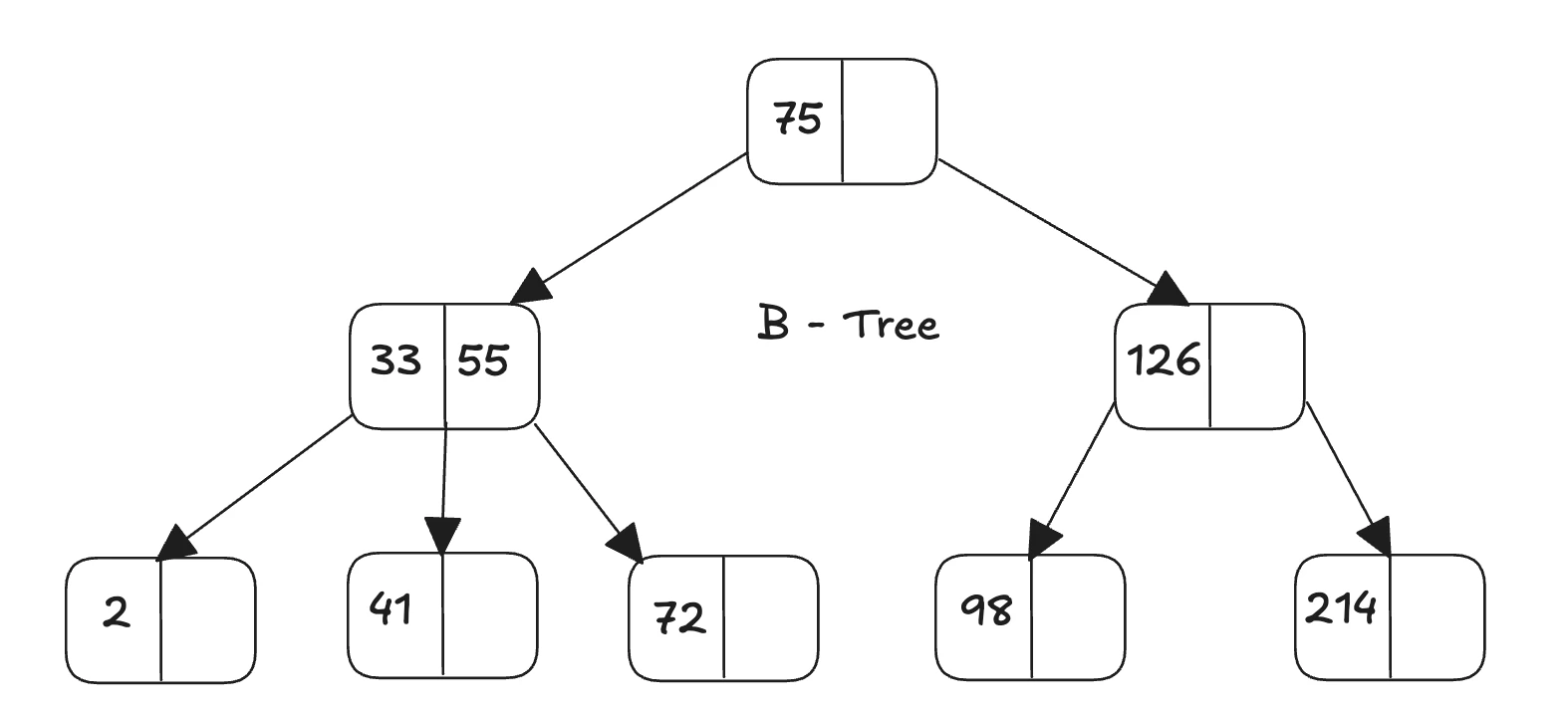
B+ Tree is the same as B-Tree with additional features like the child nodes are also linked to each other.
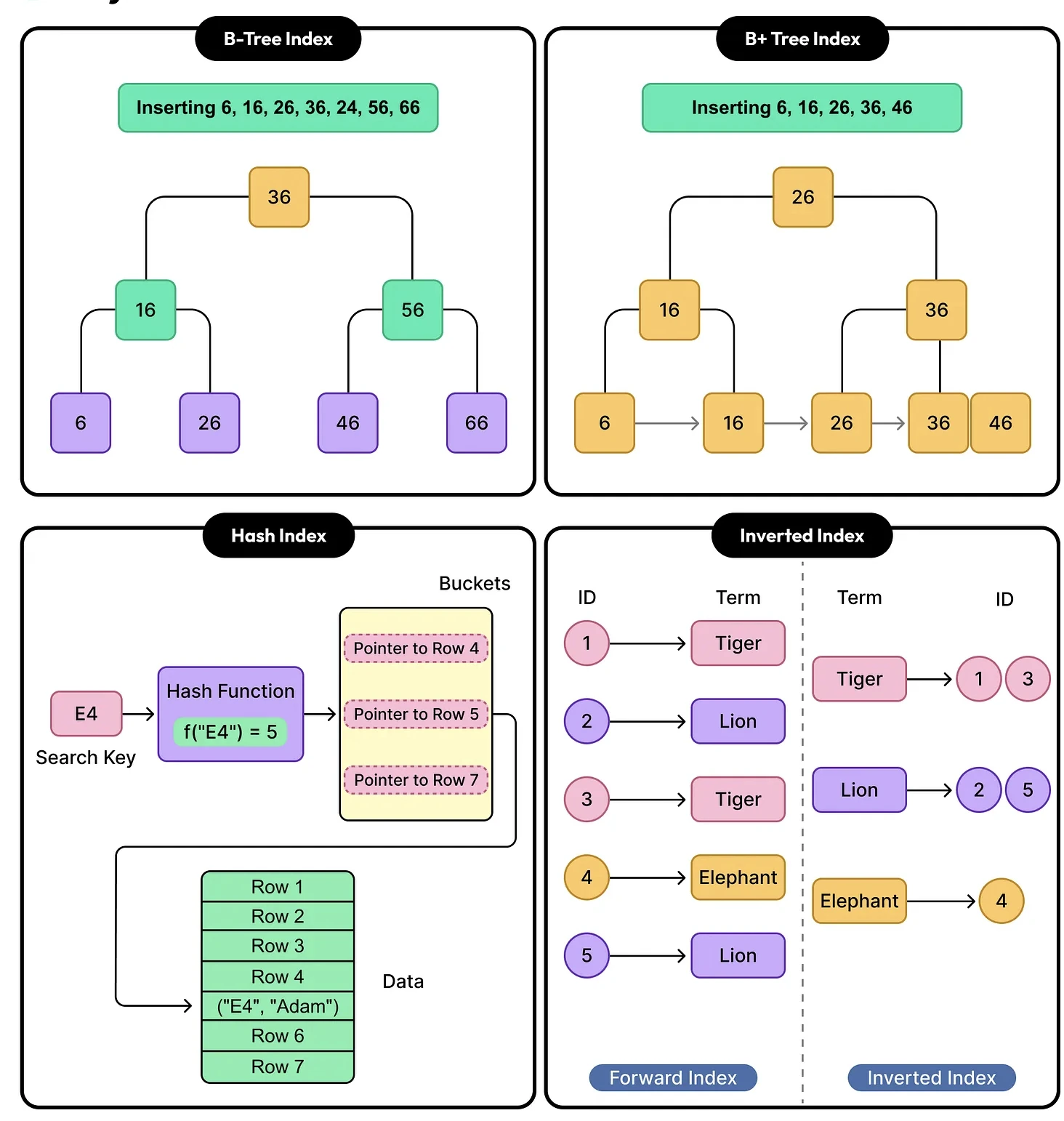
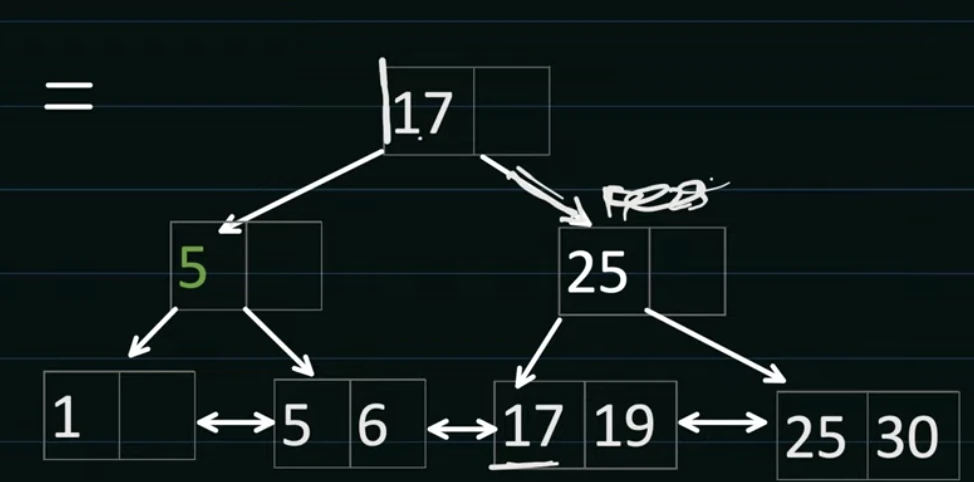
- DBMS uses B+ Trees to manage it’s Data Pages and rows within Pages.
Leaf nodes actually hold the indexed column values.
- That is why in the below diagram you can see duplicate values at index level.
Root or intermediary nodes hold value which will be used for faster searching the data. It’s possible that the value might be deleted from the DB but it can be used for sorting the tree.
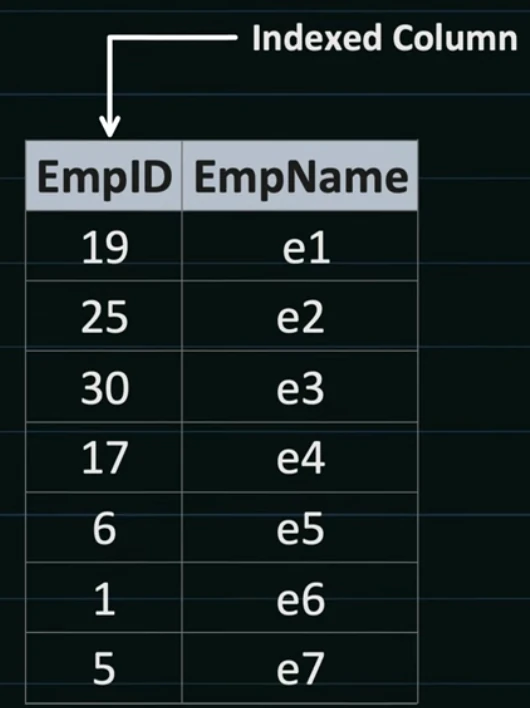
Consider storing this in B+ Tree where EmpID is indexed
But how does DBMS store these values in a Data Page ?
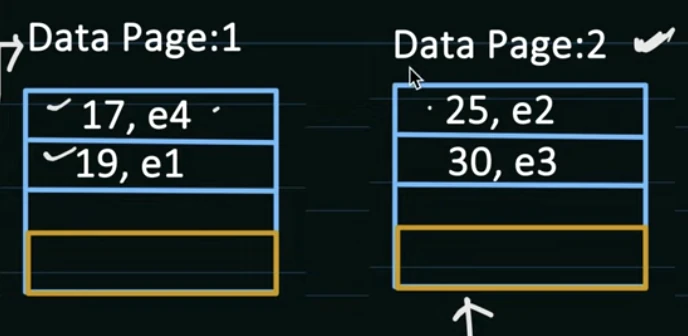
You start inserting values in the data page. The data page stores the indexed value in a B+ Tree. Suppose the data page can hold 2 values so after you insert more than 2 values Page Splitting happens. The database creates a new page and splits the data.
While inserting values in the Data page. Database also keeps mapping of data page to data block.
### Types of Indexing
Clustered Index:
Leaf nodes contain the actual data records/documents
Tree structure: Internal nodes (keys + pointers) → Leaf nodes (full records)
Data IS the index
Tree leaves = your actual data.
There can be only one cluster index per table as data can only be physically ordered one way.
Non-Clustered Index:
Leaf nodes contain index keys + pointers to where actual data is stored
Tree structure: Internal nodes (keys + pointers) → Leaf nodes (keys + pointers to records)
Data is stored separately, index just points to it
Tree leaves = pointers to your data
There can be multiple Non-Clustered indexes in the table.
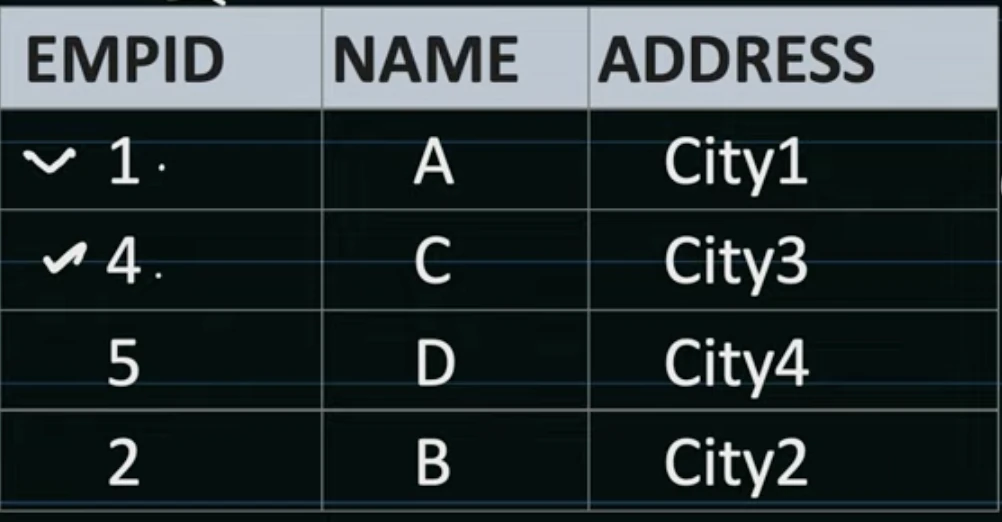
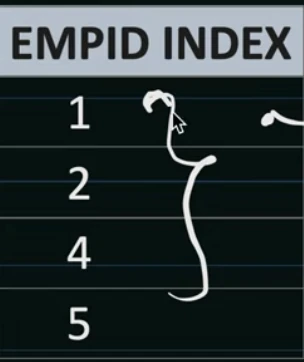
Example : Suppose we want to store this table and EMPID is PK
- Employee index will look like this.
Questions
- What happens when you search for “35” ?
The DBMS receives the search query for key "35"
The DBMS traverses down through internal nodes of B+ Tree following key comparisons reaching the appropriate leaf node containing the key "35"
The leaf node contains a pointer/reference to the actual data page. DBMS identifies which data page contains the record with key "35"
If the data page is not already in the buffer pool, load it from disk storage. The entire data page (containing multiple records) is loaded into memory
Locate the specific record with key "35" within the data page.
Return the record.
- What happens if we create index on 3 fields in SQL and MongoDB
Both SQL and MongoDB will create a compound index
If you want 3 separate index explicitly mention it although not recommended.
-- SQL
CREATE INDEX idx_users ON users (age, city, salary);

-- MongoDB
db.users.createIndex({ city: 1, age: 1, salary: 1 })- How does MongoDB store compound indexes in B+ Trees ?
- Well mongoDb creates a node out of the compound indexes for example in the above case a B+ Tree node would look like
[ “NYC” , 25 , “$180K” ]
- The sorting is done lexicographically.
System Design Patterns & TradeOffs
Design Patterns
Patterns are everywhere… you just have to see them - System design patterns
Scaling Reads
When you are designing systems with heavy read : write you will have to scale up the read capacity of the system to handle large numbers of users.
Common examples include Instagram where users read 100s of posts a day and post only about 1 post per day. So read:write is 100:1
Ways….
Optimize queries + add indexes.
- Materialized views / denormalization: precompute heavy joins/aggregations.
Add Redis cache with TTL + stampede protection.
Add read replicas. Primary handles writes, replicas serve reads , load spreads across multiple servers.
Problems ?
Cache invalidation
- Whenever user updates a value in DB → Invalidate the cache
Time  Actor         Action
T1    A             Cache miss → Cache has no user:123.
T2    A             Fetches old data ("Alice") from DB. Takes 50ms.
T3    B             Updates DB → sets name = "Alicia".
T4    B             Invalidates cache key user:123. (Cache now empty again.)
T5    A             Finishes DB fetch (old data) and writes it back to cache!
T6    Cache         Now stores stale value "Alice".
T7    Future reads  Serve "Alice" (stale) for 5 min until TTL expires. 😬
How to solve
Add versioning with keys in redis. Let old updates write stale values to old keys , it will be removed after TTL
Let the cache serve slightly stale data for a few seconds. A background thread or job refreshes the cache periodically.
Hot key : certain keys which receive very high read / write traffic compared to others.
Hot keys can overload a single server
Key level sharding, divide that hot key across multiple shards → userId:bieber:0 , userId:bieber:1 , userId:bieber:2. Then you can store these shards across multiple servers.
Scaling Writes
Realtime Updates
Long Running Tasks
Dealing with Contention
Large Blobs
Multi Step Process
Stateful vs Stateless
Stateful
Here the server remembers who is the client (the state of client is persisted at server)
This is most common as you can see in session based authentication, server identifies a client based on the cookie stored at the client side. At the server side, the server has a mapping w.r.t that cookie. So here state is persisted at the server side
Stateless
- Stateless design treats each request as an independent transaction. The server does not store
any information about the client's state between requests.
In JWT based authentication server stores no information about the user being authenticated; the server just contains the secret key from which it verifies the signature and then process for that user.
All client metadata is stored in JWT token in the payload as base64Encoded
Strong vs Eventual Consistency
Strong consistency
Ensures that any read operation returns the most recent write for a given piece of data
This means that once a write is acknowledged, all subsequent reads will reflect that write
Banking Apps → Strong consistency is required.
Eventual consistency
Ensures that, given enough time, all nodes in the system will converge to the same value.
However, there are no guarantees about when this convergence will occur
Youtube Likes count
Normalization vs Denormalization
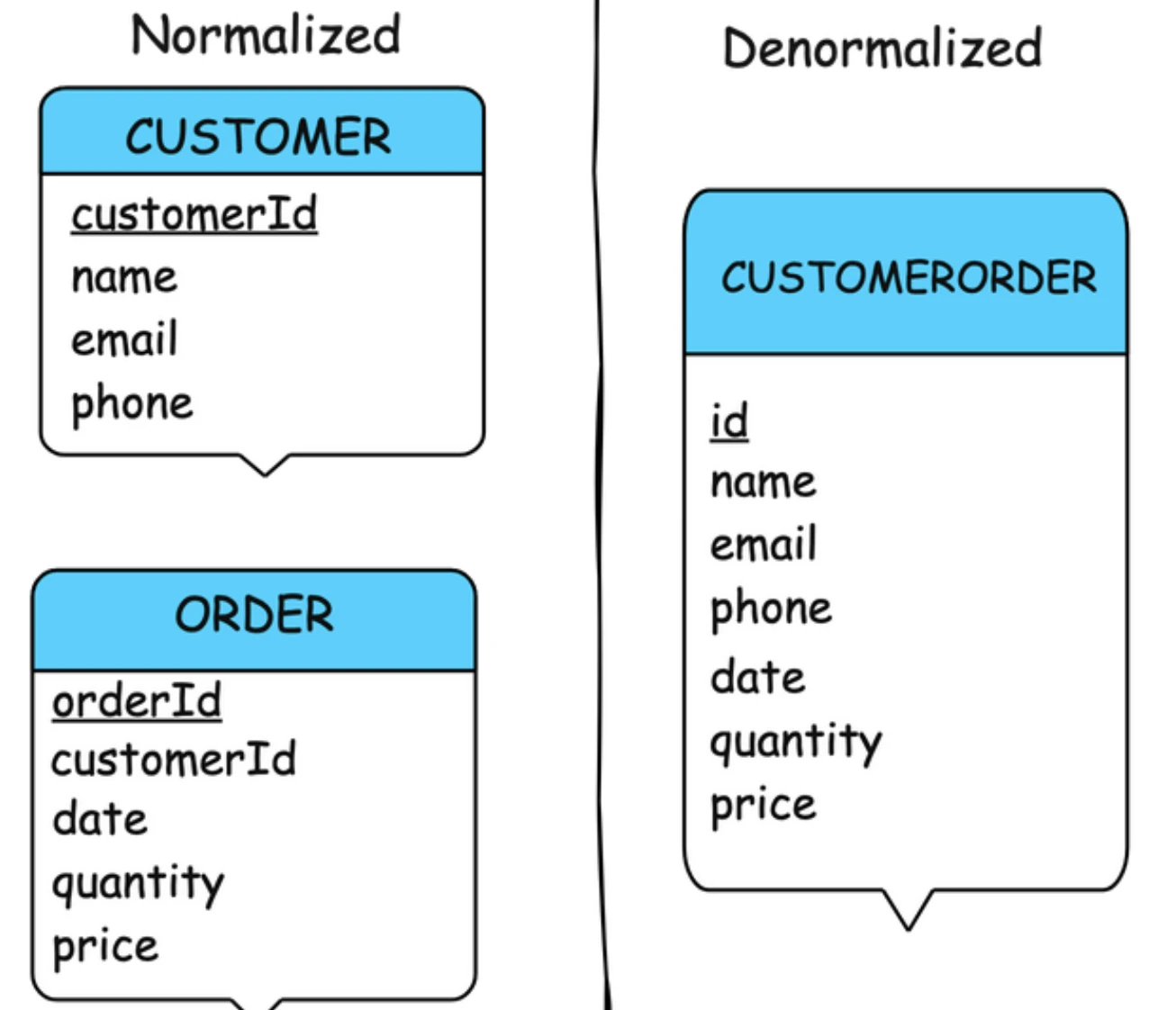
Normalization
- Normalization involves splitting up data into related tables to ensure each piece of information is stored only once. It aims to reduce redundancy and improve data integrity.
Example :
- Customers and Orders have a one-many relationship. One customer can have multiple orders
So in the CustomerOrder table there can be 5 rows with same customer_id and different orderId
We can divide that table into 2 tables customer and order
So now the customer will just store customer information see the above image. And ORDER table will store customerId. Now if a customer has 5 orders ORDER table will have 5 rows of different order_id and same customer_id
Now if a customer changes name we don’t have to update multiple rows in customerOrder table, we can simple update that customer in CUSTOMER table as ORDER table is relying on just customer_id
What if you have 10M orders and 1M customers and now you want All orders of Customer=2 with customer Details…
SELECT o.order_id, o.order_date, o.total_amount,
       c.name, c.email, c.phone
FROM ORDERS o
JOIN CUSTOMERS c ON o.customer_id = c.customer_id
WHERE o.order_date > '2024-01-01';
The problem with normalization is that it becomes difficult to query across multiple tables (joins).
JOINS operations is really expensive on 10M rows
Database must:
Read from ORDERS table (10M rows)
Look up CUSTOMERS table (1M rows) for each order
Match customer_id for every single order
This becomes really expensive as reading from two tables instead of one , query time has increased dramatically.
The reason we split the table in the first place was because if there are customer updates then we don’t have to update multiple rows.
But if you see in the case of READ-Heavy system, there will be
95% reads (viewing orders, order history)
5% writes (placing new orders, updating customer info)
With normalization:
Every order display requires a JOIN
10M orders = 10M potential JOINs
You're optimizing for the 5% (writes) at the cost of 95% (reads)
This goes even worse in Distributed systems as now JOINS should happen over network.
Denormalization
- Denormalization is the process of combining data back into fewer tables to improve query
performance
This often means introducing redundancy (duplicate information) back into your database.
Now you have a single CustomerOrder table
- Select * from CustomerOrder where orderId = 2 —> Much faster than join
TCP vs UDP
- Two key protocols for transmission of data over the internet are TCP and UDP
TCP (Transmission control protocol)
Reliable
- Ensures all data packets arrive in order and are error-free.
Connection-Oriented
- Establishes a connection before data transfer, making it ideal for tasks where accuracy is crucial (e.g., web browsing, file transfers).
Slower
- The overhead of managing connections and ensuring reliability can introduce latency
UDP (User Datagram protocol)
Faster
- Minimal overhead allows for quick data transfer, perfect for time-sensitive applications.
Connectionless
- No formal connection setup, data is sent without guarantees, making it ideal for real-time applications (e.g., video streaming, online gaming).
Unreliable
- No error-checking or ordering, so some data packets might be lost or arrive out of order.
Long Polling / SSE / WebSockets
Long Polling
In a Long Polling connection, the client repeatedly requests updates from the server at regular intervals.
If the server has new data, it sends a response immediately; otherwise, it holds the connection until data is available.
This can lead to higher server load due to frequent requests, even when no data is available.
SSE
In SSE the client establishes a persistent and long-term connection with the server. The server uses this connection to send data to a client
SSEs are best when we need real-time traffic from the server to the client
WebSockets
Persistent, full-duplex connection between the client and server, allowing real-time data exchange without the overhead of HTTP requests.
The client establishes a WebSocket connection through a process known as the WebSocket handshake.
If the process succeeds, then the server and client can exchange data in both directions at any time
Interviews
Template
Clarify the Problem Before Writing Anything
Scope the problem
Ask constraints upfront
Define success criteria
Define Functional & Non-Functional Requirements
Functional Requirements
Non-functional Requirements
Identify biggest technical challenge
Estimate Scale & Plan Capacity
Users per second / Requests per second
Storage needs
Throughput & Database needs
Break the System Into Core Components
Major building blocks (API Gateway, Load Balancers, Services, Databases)
Simple and scalable design
Define interactions between services
Initially focus on a simpler design that meets the Functional Req. Later iterate it to add more complexity.
Choosing the Right Database
SQL vs. NoSQL trade-off
Consistency vs. availability
Heavy reads vs. heavy writes
Data growth considerations
Designing database schema
Optimize storage and retrieval based on access patterns
API Design (Optional)
List down the APIs you want to expose to external clients based on the problem.
Select an appropriate API style based on the system's requirements and the clients' needs (eg.. RESTful, GraphQL, RPC)
Dive Deep into key components
Add more complexity to your HLD here that meets NFR
Scaling the System for Millions of Users
Load balancing
Caching (Redis, CDN)
Asynchronous processing (queues)
Sharding & replication
Fault Tolerance & Failure Handling
Service crashes (retries, circuit breakers)
Implement circuit breaker patterns to prevent cascading failures and protect the system from overload.
Implement retry mechanisms with exponential backoff to handle temporary failures and prevent overwhelming the system during recovery.
Database failures (replication, failover)
Traffic spikes (autoscaling)
Monitoring & Observability
Metrics
Logging
Alerting
Practice
Only way to improve…..
Follow this → System Design Questions